
FAQ-Streaming Services
This page all of the FAQ information for the streaming services supported by the Linn networks player, (Linn DS &DSM products).
General streaming points
|
Streaming services are based on an internet stream. This is a constant stream of data from the internet. if there are any interruptions or low bandwidth, (limited data rate), this can cause the Linn DS/DSM to mute when playing this music stream. If you get muting, (audio cutting in and out), this can be due to high network traffic in your area, business first thing Monday morning, or heavy usage of video broadcast (like football matches). Some ISP's (ISP is your Internet Service Provider, they supply your Broadband connection) will also reduce your bandwidth of certain types of network traffic, typically BitTorrent (P2P). Some ISPs will mistake your Radio stream for a BitTorrent and throttle this network traffic and cause muting of your Internet Radio. Most domestic broadband states am "up to" bits speed of your broadband but does not state a minimum connection speed.(If you do a quick speed test will appear to be OK (this is a burst of data). But the internet Radio is a constant stream of data. Any long breaks/delays in this stream can cause the internet Radio to mute) If you upgrade to a Business broadband (typically only a small amount extra), these will state a MINIMUM broadband bps. So if your area has difficulty in Internet Radio, suggest trying a upgrading your broadband to a Business broadband with a minimum speed of 500kbps, this should reduce/eliminate your internet radio muting. We have had reports that the network settings of the broadband router can cause issues. If you are technically minded, check the DNS settings of your router. We found that Google DNS works best with DNS1 - 8.8.8.8, DNS2- 8.8.4.4. On your Router check that the VoIP is turned off. This is only to save a lot of your bandwidth to Soft phone such as Skype or Face-time and stave other applications from using this bandwidth. Testing your networkCheck Network Applications page to find applications to test your ISP broadband speed.
Chromecast, Tidal Connect...
|
|
Tidal works on Linn network players running Davaar 23 firmware or later, controlled with the Linn App (version 4.4.9 or later). Tidal is available in the countries listed on the Tidal website. Enable serviceTidal is switched on or off for each Linn player in Manage Systems:
Tidal then appears, or disappears, in the Linn App's Browse options. What audio formats are supported?Hi-Res FLAC up to 192 kHz / 24-bit is supported from Davaar 103 firmware onwards. To receive it, set Tidal's audio quality in Manage Systems to Hi-Res (up to 192k 24bit):  Note: Hi-Res Tidal streams need more processing power than older Linn players with PowerPC (PPC) hardware have. On those players, from Davaar 105 onwards, Tidal Hi-Res streams play at up to 48 kHz. Dolby AtmosLinn network players don't currently support Dolby Atmos. Tidal tracks available in Atmos play as Hi-Res FLAC instead. Tidal streaming issuesI can only play Tidal on one of my Linn playersEach Tidal account can only stream to one device at a time. If you play different Tidal music on several Linn players (including Kustom DSM streamers) using the same account, only one will keep playing and the others will stop. To play Tidal on several Linn players at once, you need a Tidal Family plan, with each Linn player signed in to a different family member's account. See Tidal's pages on subscription types and streaming on several devices. Setting up a Tidal account, I get the error "Sorry, no flowId is set up"This is a Tidal account problem. Contact Tidal support for help. The Linn App shows a red "Connection failed" messageEither your Linn player can't reach the internet, or Tidal's service is offline. Sign out of Tidal in the Linn App, then sign in again. This normally fixes it. If it doesn't:
If none of these help, contact Tidal support. Music from Tidal is dropping outYour router may be connecting you to a distant Tidal server. Try setting your router's DNS settings to Google Public DNS. Your home network or broadband connection may also be struggling with the higher bandwidth of Hi-Res audio. If drop-outs are frequent, choose a lower Tidal audio quality in Manage Systems. The new setting takes effect from the next track, so skip to a new track to check whether the drop-outs have stopped. Tidal Audio QualityIn Manage Systems (part of your Linn Account), the Tidal settings on the Music tab are:
A change takes effect from the next Tidal track played. If you have internet problems, a lower setting can stop drop-outs. All current Tidal subscription plans include lossless and Hi-Res streaming. |
|
Qobuz works on Linn network players running Davaar 29 firmware or later, controlled with the Linn App. Enable serviceQobuz is switched on or off for each Linn player in Manage Systems:
Qobuz then appears, or disappears, in the Linn App's Browse options. Linn App will not work with QobuzThe connection between the Linn App, your Linn player and Qobuz may be confused. To reset it:
Qobuz music should now play on your Linn player.  Qobuz service appears to be disabledCheck your Linn player's firmware version. Qobuz changed its login procedure, and Linn updated its firmware to match. Update your Linn player's firmware using Manage Systems. Qobuz is not streaming in Hi-Res qualityCheck that the Maximum audio quality for Qobuz in Manage Systems is set to Hi-Res. Current Qobuz subscriptions (Studio and Sublime) all include Hi-Res streaming, but some older Qobuz plans did not. Also, not every album on Qobuz is available in Hi-Res: some are CD quality only. Qobuz shows tracks, but I can't play them (Play and Skip are greyed out)Qobuz music is licensed by country, so some music shown may not be available for streaming where you live. This can include music you have bought and downloaded from Qobuz, which isn't always licensed for streaming. Qobuz tracks only play for 30 secondsYou don't have a paid Qobuz streaming subscription. Without one, Qobuz only plays a 30-second preview of each track before moving on to the next. My playlist has Qobuz tracks that the Linn player won't playThis usually means the tracks were added without a paid Qobuz subscription. Links to these tracks only work for a limited time, and have now expired. Check that you have a paid Qobuz streaming subscription, then add the tracks to your playlist again. Music drops out when playing QobuzYour router may be connecting you to a distant Qobuz server. Try setting your router's DNS settings to Google Public DNS. Your home network or broadband connection may also be struggling with the higher bandwidth of Hi-Res audio. If drop-outs are frequent, choose a lower Maximum audio quality for Qobuz in Manage Systems. If you have a dual-WAN router that shares traffic between two internet connections (load balancing), check that it is set up correctly, as switching between connections can interrupt streaming. < FAQ Streaming Service HOME page
Qobuz Audio QualityWithin the Linn Account Manage Systems MUSIC section you can change the audio quality of Qobuz. Options available are:
|
To play Deezer on a Linn DS/DSM you need a Deezer subscription and use the Linn App to play your Deezer subscription. Enable service
Can I play Deezer on any Linn DS/DSM/HUB?
In Linn App Explore I get the message Device Unsupported
My Deezer PINs no longer work
|
|
This allows you to play CD & Hi-Res (up to 192k / 24bit) quality music from your Free, Prime & Unlimited Amazon Music accounts directly feeding your Linn DS/DSM. (The availability and playback controls vary depending on your account type)
Requirements
Linn DS/DSM products supportedAmazon Music is only supported on Linn players with ARM-Linux hardware. Older Linn players with PowerPC (PPC) hardware can't support it: from Davaar 117 firmware onwards, their flash memory is full, and some of the software modules needed aren't compatible with PowerPC hardware. You can still listen to Amazon Music on an older Linn player by playing it on an ARM-Linux player and sharing it using Songcast. For example, you can play Amazon Music on a Linn Selekt DSM and Songcast it to a Sneaky DS.
Enable Amazon Music serviceIn the Linn App:
 |

Enable service
|
AIRPLAYiPad/iPhone, cannot find Linn DS in Airplay
IOS10
IOS11/12 cannot find Linn DS in Airplay
 Check Apple for any adviceClick this link https://support.apple.com/en-gb/HT20429 for suggestions by Apple Airplay no audio but MAC states that it is playingOSX 14 Somona
Airplay/Songcast keeps dropping out on not starting on a Wifi connectionThis can be a common problem if the Wifi communications to temperamental. The commands from the iPad/Android are sent but lost because communications noise. REASONS FOR INTERMITTENT OPERATION Bluetooth interfering with WifiBluetooth uses the same frequency range as typically used Wifi channel. Turn OFF BLUETOOTH on your iPad/iPhone and this should improve the Airplay communications. IOS 13 Screen time
Apple devices Wifi settingsrequire the Wifi to be set-up to a specific configuration or it will otherwise start looking for a Wifi signal that does support this configuration
Wifi noiseThis noise can be generated by Microwave ovens, DECT phones, wireless Video repeater, Taxi Radios, neighbours Wifi etc. so we would suggest checking this with wifi scanner software such as Wifi-Analyzer / Insidder / NetSpot / VIStumbler, this can be used to find out who else is broadcast on the same channel are your Wifi and causing interference. If you have DECT phones make sure that they are not close (>2M) to your Router or Wifi devices Routers / Wireless Access PointsSome Routers/WAP devices are very poor with UPnP control, namely Sky and BT. If you have one of these Routers we would suggest adding 'Subnet' Router of one that Linn has tried and works reliably. iPad/iPhone cannot see any DS or LibraryFirst try and do a hard reset of your iPhone/iPad, Press AND HOLD both the HOME key and the power button until the Apple symbol appears on the iPhone/iPad display. then retry Kinksy Wifi Setting checkIf you still have issues it has been found that updates to the Apple operating system (IOS 5.1.0) have been found to cause wireless communications issues for any Apple software. We have found that your Wifi device should be setup with SSID name - A single word with unique name. Encryption Mode: * WPA3 Personal, WPA2/WPA3 Transitional or WPA2 Personal (AES) for Wireless authentication * AES : Wireless encryption Channel width: 2,4GHz band - 20 MHz 5/6 GHz band - any bandwidth Hidden network - Disabled WMM - Enabled NAT - Enabled Forget the Network' On your iPad, then re-attach it after power cycling the Wifi device (WAP) * DTIM: Apple recommends 3 or greater This should improve all communications to your i-device Apple link Apple link 2 Apple iDevice are not very good at roaming. What this means is if you have Wifi transmitters it will hold on to it last one until the signal is below 1%. SO you could be right beside the other Wifi transmitter and having issues as the iDevice is still connected to the one furthest away. try switching you Wifi Off (or use Flight mode), wait a few seconds and switch on Wifi, this will hopefully jump to the stronger signal. Check the Router settingsIt has been reported that Routers with QOS enabled will cause problems. Disable QOS on the Router to see if this improves communications Apple link 3 Check Internet connectionsIOS6 appears to check if there is internet access, if it cannot find internet access it will start searching for a WiFI connection with Internet. This jumping around Wifi connections can cause poor communication with the Kinsky software. On the iPad/iPhone turn ON flight mode, then re-enable the Wifi connection. This will stop the iPad/iPhone from searching for Internet access. (This does not affect Browser access to the internet on the iPad/iPhone, only stops the iPad/iPhone for check for software updates) App checkOther apps running in your iPad/iPhone can cause some issues. Try restarting your iPad/Android and use Kinsky before starting any other apps. This will tell you if any other App is causing a problem.
|


Spotify FAQWhat Is Spotify Connect?Spotify LosslessSpotify Lossless (Linn statement, September 2025) Linn intends to support Spotify Lossless. This needs significant firmware changes, also involving third parties, so there is no fixed date for it yet.
WiiM solution to Spotify Lossless, Amazon Music, (also ChromeCast, Tidal Connect...)Currently, a solution for Spotify lossless on the Linn DSM's, or Amazon Music for older products, you can use a WiiM media streamer . 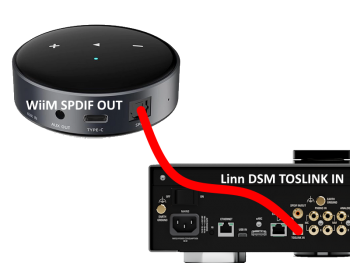
Set up of the WiiM for use with the Linn DSM is easy
What Do I Need To Use Spotify Connect?To use Spotify Connect on a Linn DS, you will need to meet the following requirements:
If you have any difficulties connecting to the Linn DS/DSM/HUB on SPOTIFY CONNECT and you are on the same network as the Linn DS/DSM/HUB:
How Do I Use Spotify Connect?SetupDesktop App
Mobile App
Controlling PlaybackSpotify Connect playback on a DS can be controlled entirely via the official Spotify apps. There are other ways that playback can be controlled, which are detailed below. However, browsing of the Spotify music library must always be done via the Spotify apps. The Spotify app does not need to remain open to allow streaming to continue. Music that is in your Spotify play queue will continue to play, until your play queue ends, or you pause the DS directly or via the Spotify apps. Hardware ControlsHardware buttons on the DS (where applicable) and IR remotes allow play/pause/next/prev/seek/shuffle/repeat control over a Spotify stream. On mobile apps, the hardware volume buttons on your mobile device (where applicable) can be used to control the volume on your DS while the Spotify app is open. Software Control PointsThe Linn app control point provides basic controls when on the Spotify source (e.g., play/pause/next/prev/seek/shuffle/repeat), but browsing of Spotify's media library must be done through the official Spotify app.
Notes of operation
|
Spotify is not in sync with other Linn DS/DSM room
Due to the response timing required by Spotify, Linn DS sharing this Spotify to other rooms via Songcast may not be in perfect sync with this Spotify receiving room.
|


|
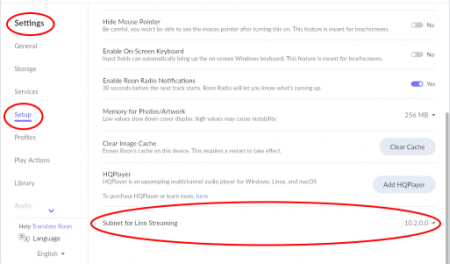
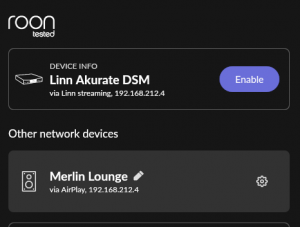
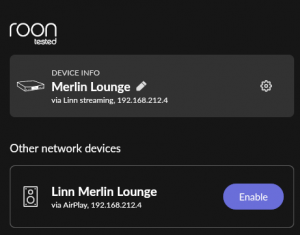
Roon uses the Linn DS/DSM as a media player, the control interface IS Roon.
|
Prestomusic
Requirements:
Linn DS/DSM products supportpesto music is only supported on Linn players with ARM-Linux hardware. Older Linn players with PowerPC (PPC) hardware can't support it: from Davaar 117 firmware onwards, their flash memory is full, and some of the software modules needed aren't compatible with PowerPC hardware. You can still listen to pesto music on an older Linn player by playing it on an ARM-Linux player and sharing it using Songcast. For example, you can play pesto music on a Linn Selekt DSM and Songcast it to a Sneaky DS.
Enable Presto Music serviceIn the Linn App:
 |

TuneInEnable service

Your Radio button in the Linn App will now show your radio favourites for that Radio provider.
Can I change the audio quality of the TUNEIN Radio
I can no longer get Linn radio stream, Linn Jazz, Linn Classical, Linn Radio, station
Does the Linn DS/DSM players play BBC Radio via TuneIn?
How do I add BBC Radio stations to my Presets?
I cannot get any foreign Radio stations, I can only get UK stations
|


airable
BBC Radio station will continue to be supported by the Linn DS/DSM products using
Configure your Linn DS/DSM for airable Radio
Your Radio button in the Linn App will now show your radio favourites for that Radio provider. Radio/Pin favourites
FAQ
|


Internet Radio FAQHow fo I add custom urls for my own radio stations
|