Difference between revisions of "MS GENERAL"
m |
m (→GENERAL) |
||
| (9 intermediate revisions by the same user not shown) | |||
| Line 1: | Line 1: | ||
| − | <noinclude>{{HIDE_PAGE_TITLE}} | + | <noinclude>{{HIDE_PAGE_TITLE}} <!--NGP 24Jan2025---> |
{{Big_Select_Button | Return to Manage Systems guide| |#B22222|white}} | {{Big_Select_Button | Return to Manage Systems guide| |#B22222|white}} | ||
| − | <br><br | + | <br><br> |
{{:Manage_Systems_Index}} | {{:Manage_Systems_Index}} | ||
<br> | <br> | ||
| − | |||
__TOC__ | __TOC__ | ||
</noinclude> | </noinclude> | ||
| Line 27: | Line 26: | ||
:;Note: You may have to bring the Linn DSM out of Standby to change configuration. | :;Note: You may have to bring the Linn DSM out of Standby to change configuration. | ||
::Check the <b>Standby</b> option further down this page. Slide the button LEFT to bring the Linn DS/DSM to turn <b>STANDBY <u>OFF</u></b> and <b>PRODUCT <u>ON</u></b> | ::Check the <b>Standby</b> option further down this page. Slide the button LEFT to bring the Linn DS/DSM to turn <b>STANDBY <u>OFF</u></b> and <b>PRODUCT <u>ON</u></b> | ||
| − | + | {{:Action:ImageZoom| [[image:Kloud-Konfig_Mini_Standby.png|centre|link=|400px]] }} | |
<br> | <br> | ||
| − | |||
====START-UP MODE==== | ====START-UP MODE==== | ||
:A number of different settings can be applied to customise the way your device starts up | :A number of different settings can be applied to customise the way your device starts up | ||
| − | ==== | + | ====Start-Up Mode==== |
:Normally, your device will power up in '''Sleep''' (aka standby). | :Normally, your device will power up in '''Sleep''' (aka standby). | ||
:Select '''Active''' to skip sleep mode and go straight to playback mode on power up | :Select '''Active''' to skip sleep mode and go straight to playback mode on power up | ||
| − | ====Auto | + | ====Auto-play==== |
:Normally, you must press play to start playing audio. | :Normally, you must press play to start playing audio. | ||
:Change this setting to '''On''' to make your device play audio immediately when a source is selected (only relevant to Playlist, Radio, and Songcast) | :Change this setting to '''On''' to make your device play audio immediately when a source is selected (only relevant to Playlist, Radio, and Songcast) | ||
| Line 45: | Line 43: | ||
:Normally, your device will start up on the last source you were listening to. | :Normally, your device will start up on the last source you were listening to. | ||
:You can change this setting to make sure the device starts up on a specific source instead | :You can change this setting to make sure the device starts up on a specific source instead | ||
| − | |||
| − | |||
| − | |||
| − | |||
====IPv6==== | ====IPv6==== | ||
| Line 88: | Line 82: | ||
====UPLOAD DEVICE LOGS==== | ====UPLOAD DEVICE LOGS==== | ||
:This is for diagnostics only and should only be used when told to by Linn personnel. | :This is for diagnostics only and should only be used when told to by Linn personnel. | ||
| + | ::If you want to report any issues to Linn then use the <b>"REPORT TO LINN"</b> on the [[Linn App]] | ||
====RECOVER DEVICE FIRMWARE==== | ====RECOVER DEVICE FIRMWARE==== | ||
| Line 114: | Line 109: | ||
<br><br><br><br><br><br><br> | <br><br><br><br><br><br><br> | ||
<hr style="width:50%; margin-left:25%; margin-right:25%;"><br><br> | <hr style="width:50%; margin-left:25%; margin-right:25%;"><br><br> | ||
| − | :: | + | ::[[File:Kloud-General-Phono Stage.png|450px|right|link=]] |
=====Phono Stage (Urika-II)===== | =====Phono Stage (Urika-II)===== | ||
| Line 136: | Line 131: | ||
====Test Tones/Volume Offsets==== | ====Test Tones/Volume Offsets==== | ||
| − | :: | + | ::[[image:Manage_Systems-Volume_Offsets.png|300px|right| link=]] |
This allows you to trim the channels. Hit the Play button against each channel (marked in RED) and adjust the channel trim level.<br> | This allows you to trim the channels. Hit the Play button against each channel (marked in RED) and adjust the channel trim level.<br> | ||
Latest revision as of 12:29, 23 June 2025
Return to Manage systems guide
GENERAL
SPACE
DISPLAY
SOURCES
MUSIC
OUTPUTS
VOLUME
PRIVACY
REMOTE
HDMI
SURROUND
WI-FI
ADVANCED
BACKUP
Contents
- 1 GENERAL
- 1.1 DEVICES
- 1.2 START-UP MODE
- 1.3 Start-Up Mode
- 1.4 Auto-play
- 1.5 Startup Source
- 1.6 IPv6
- 1.7 Bluetooth
- 1.8 Analog Input Mode
- 1.9 XLR Output
- 1.10 RCA Output
- 1.11 RCA Output Transformer
- 1.12 Standby
- 1.13 REBOOT DEVICE
- 1.14 RESTORE FACTORY DEFAULTS
- 1.15 UPLOAD DEVICE LOGS
- 1.16 RECOVER DEVICE FIRMWARE
- 1.17 Test Tones/Volume Offsets
- 2 Setting up Exakt loudspeakers for first time
GENERAL
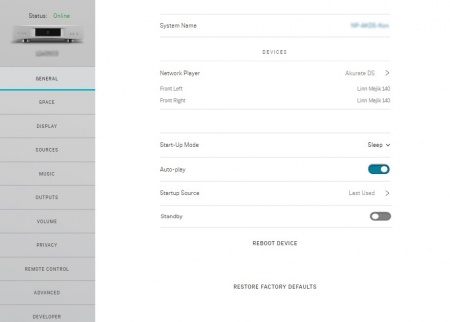 DEVICESNetwork Player

START-UP MODE
Start-Up Mode
Auto-play
Startup Source
IPv6
Bluetooth
Analog Input Mode
XLR Output
RCA Output
RCA Output Transformer
Standby
REBOOT DEVICE
RESTORE FACTORY DEFAULTS
UPLOAD DEVICE LOGS
RECOVER DEVICE FIRMWARE
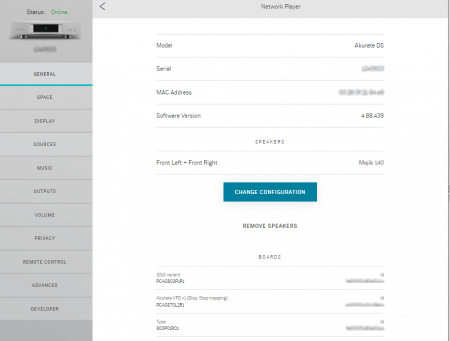
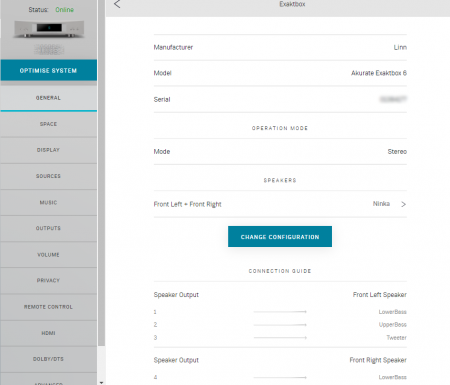
Exaktbox
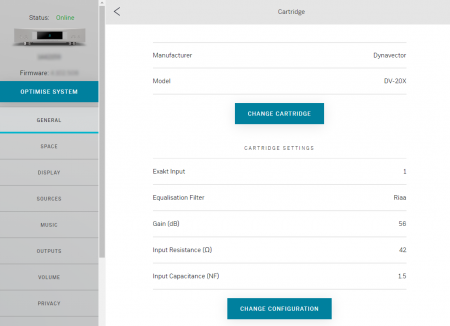
Phono Stage (Urika-II)Hit the > button to get details of the Urika-II
DEVICE SETUP
Change Configuration
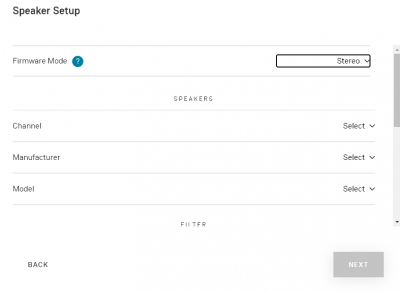 Speaker
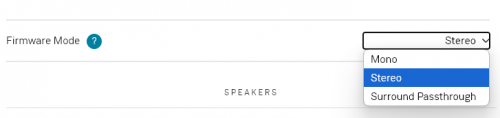 Firmware Mode
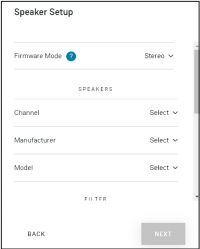 Selekt Speaker
FILTER
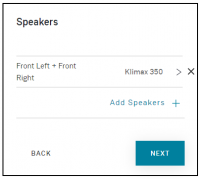
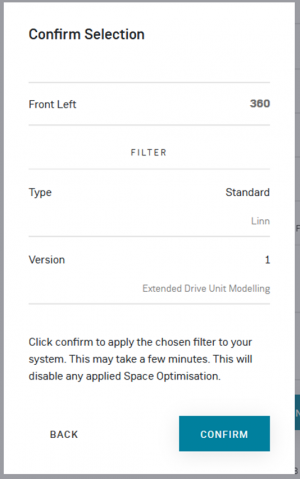
Confirmation Selection
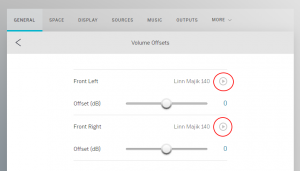
Test Tones/Volume OffsetsThis allows you to trim the channels. Hit the Play button against each channel (marked in RED) and adjust the channel trim level.
|


Setting up Exakt loudspeakers for first time
|
To set up Exakt speaker(s) : 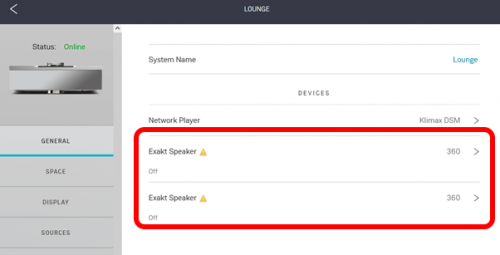

|
