TuneIn Radio information
If you have no radio then check http://status.tunein.com this will show any streaming issues with Tunein Radio
Contents
- 1 Customising your Radio Presets using TuneIn Radio (previously RadioTime)
- 2 Can I change the audio quality of the TUNEIN Radio
- 3 I can no longer get Linn radio stream, Linn Jazz, Linn Classical, Linn Radio, station
- 4 Does the Linn DS/DSM players play BBC Radio via TuneIn?
- 5 How do I add BBC Radio stations to my Presets?
- 6 I cannot get any foreign Radio stations, I can only get UK stations
Customising your Radio Presets using TuneIn Radio (previously RadioTime)

Create a TuneIn Radio Account
- Create a TuneIn Radio account at http://tunein.com/
If you create an account via FACEBOOK, select the "My Info" on the account details to get your Username to add the the Konfig.

Choose your Presets (This format can depend on your web browser)
- Find your favourite stations and add them to your presets

- Within your presets you can create numerous folders. Only presets stored in the default folder will be accessible on your Linn DS.
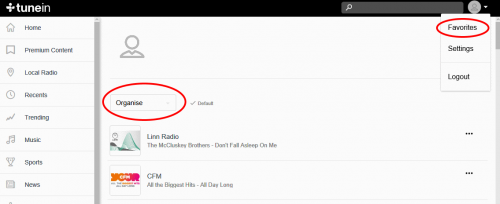
Note: You can also edit your Presets using the Tunein App for Apple iPhone/iPad, Android etc
Configure your Linn DS to use you Account
- Linn DS firmware needs to be Cara 6 or higher for radio functionality
- Get your Username from Tunein Settings
- Enter this Tunein Username into the Preset Account (Tunein) or TuneIn Username Account box
In Manage Account
- Go into the MUSIC tab
- Scroll to TuneIn Radio
- Enabled this service
- enter/rename your TuneIn Username into the "TuneIn Username" field.
- Go into the MUSIC tab
Can I change the audio quality of the TUNEIN Radio
- NO, the Linn DS/DSM.HUB only plays the Radio stream provided by TUNEIN.
I can no longer get Linn radio stream, Linn Jazz, Linn Classical, Linn Radio, station
- From June 2022 TuneIn have removed these Linn Radio streams from their supported list.
- These stations are now available using the
 radio. Click <HERE> for more information on how to change your Linn DS/DSM radio to
Does the Linn DS/DSM players play BBC Radio via TuneIn?
- Yes, the Linn DS/DSM/HUB will continue to use TuneIn to access and play the BBC radio stations.
- From the 30th September 2019 BBC radio introduced changes to what can access their Radio stations via TuneIn. This is mainly for devices that can support using the BBC Sounds App. The Linn DS products do not support the Sounds App can will continue to have BBC Radio playback rights using TUNEIN.
- BBC radio is ONLY available within the UK
- Check the BBC Sounds >HELP< section for more information.
How do I add BBC Radio stations to my Presets?
- Select the TuneIn button in Kazoo or Linn App and find the BBC, or any other Radio station you wish to add in selection tree
- Press the three dots on the right-hand side of the station and enable/disable the Favourite, (TuneIn > Favourite in Linn App).
- Complete
I cannot get any foreign Radio stations, I can only get UK stations
- Due to a legal case between TuneIn and Sony Music, Warner Music. on licences. UK radio stations have licences for UK webcasting. However, non-UK based radio stations were not licensed to webcast music within the UK,
- This is a TuneIn issue we are waiting for them to resolve. The alternative is to configure the Linn DS/DSM with airable internet radio.
