Template:Manuals:Selekt Dial
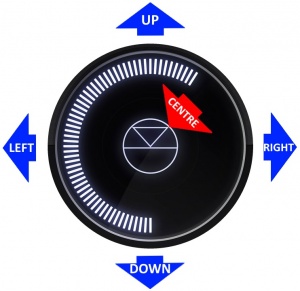
- GO INTO SLEEP:
- Press the dial CENTRE and continue to press the CENTRE (approx 2seconds) until the volume indicator dial starts to decrease.
- BRING OUT OF SLEEP:
- Press any of the UP/DOWN/LEFT/RIGHT or CENTRE of the dial.
- SOURCE SELECT
- Press the dial DOWN to list the inputs available menu
- Scroll UP/DOWN the selection.
- Press RIGHT to select source or LEFT to cancel selection menu
- PLAY/STOP/PAUSE- MUTE/UNMUTE
- A quick press of the dial CENTRE will toggle between PLAY and STOP/PAUSE
- (Radio-PLAY/STOP, Playlist-PLAY-PAUSE).
- (Other sources-Mute/Unmute).
- TRACK/PRESET PREV/NEXT
- A quick press of the dial LEFT/RIGHT jump to Playlist tracks or Radio stations.
- Volume
- Rotate dial clockwise to increase volume, anti-clockwise to reduce volume. The dial indicators will tell you the present volume.
- LINN DSM INFORMATION
- Software version
- With the Linn DSM out of Sleep mode
- Press dial UP to enter Service menu
- Scroll UP/DOWN to highlight "Software Update"
- Press RIGHT to select or LEFT to cancel Service menu
- Linn DSM "Properties" (Room name, device name, IP address etc)
- Press dial UP to enter Service menu
- Scroll DOWN to highlight "Properties"
- Press RIGHT to select Properties
- Scroll DOWN to highlight "Device"
- Press RIGHT to select Device
- Linn DSM "Settings" (Balance, Lipsync, Surround volumes etc)
- Press dial UP to enter Service menu
- Scroll DOWN to highlight "Settings"
- Press RIGHT to select or LEFT to cancel Settings menu
Note: Cancel any previous menus by pressing LEFT key.
- SURROUND TRIM
- With the Selekt DSM out of Sleep mode
- Press dial UP to enter Settings menu
- Press RIGHT to select or LEFT to cancel Settings menu
- Scroll UP/DOWN to highlight "Surround"
- Press RIGHT to select or LEFT to cancel Surround menu
- Select a the channel and trim with UP/DOWN
Contents
- 1 My Selekt DSM has a RED Linn symbol on the dial, what does this mean?
- 2 I get a flashing Linn icon ON and OFF within the volume dial, what does this mean?
- 3 i get a pulsing Linn icon within the volume dial, what does this mean?
- 4 What does the shimmering dial mean?
- 5 What does a dim/bright dial mean?
My Selekt DSM has a RED Linn symbol on the dial, what does this mean?
 If you do not have a live network/LAN connection on the Selekt DSM the Linn symbol on the dial will go red.
- If your network cable is plugged in and your network/LAN is alive then check that you have the network/LAN cable plugged into the LAN socket (#3 on the back panel diagram) and NOT the Exakt socket (#10 back panel diagram).
 After a live network/LAN connection is made the LINN symbol on the dial will turn white after 5-10 seconds.
I get a flashing Linn icon ON and OFF within the volume dial, what does this mean?

- This means that the Selekt DSM is in :
- Searching for Exakt speakers after being woken from Sleep (typically only flashes for a couple of seconds after waking from Sleep)
- or
- FALLBACK mode : Fallback is a state that means that the product is waiting for a software update. To stop this flashing either:
i get a pulsing Linn icon within the volume dial, what does this mean?

This shows that the Selekt DSM is in PAUSE mode. (This can only be seen on Playlist and streaming service sources, such as Qobuz, Tidal etc. It will not occur on Radio station playback.)
What does the shimmering dial mean?
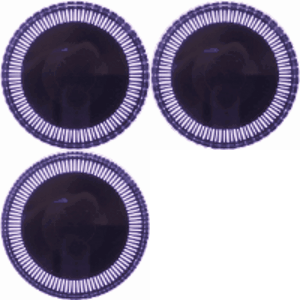
This is to show that the Selekt DSM is starting up after a mains power on. It will typically do this in 30–45 seconds, but if the Linn Selekt DSM is performing a software update, this may take a little longer.
What does a dim/bright dial mean?

This is to show when the Selekt DSM is in Mute mode.
