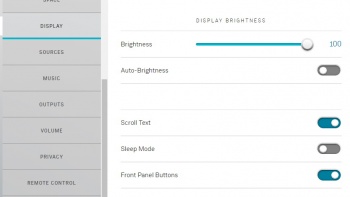
These options are only a review of what MAY be available on your Linn DS/DSM.
Brightness: If Auto-Brightness is turned off, then this will allow you to set the brightness of the Linn DS/DSM display.
Auto-Brightness: Enabled will allow the Linn DS/DSM to detect the external brightness via it front panel sensor and adjust the display brightness accordingly.
Scroll Text: When enabled, this will scroll the text on the front panel when media changes.
Sleep Mode: Put the display to sleep if there are no display updates after a certain amount of time.
Front Panel Buttons: This will stop ALL front panel buttons working, including SLEEP. This is to stop kids from playing with the buttons and turning up your volume when you are not there.
Power Indicator (Active Mode): Illumination control of either the Linn DSM name or front glow when out of standby
Power Indicator (Sleep Mode): Illumination control of either the Linn DSM name or front glow when in standby
Wake Display on Proximity Detection: if a hand is brought close to the front panel or dial, then this will bring the display out of sleep mode
Discrete Mode: Minimal front panel display. That is, no track change information.