Difference between revisions of "MS DISPLAY"
m |
m (→DISPLAY) |
||
| (One intermediate revision by the same user not shown) | |||
| Line 12: | Line 12: | ||
<!--<font color=red>--->'''These options are only a review of what <u>MAY</u> be available on your Linn DS/DSM.'''<!--</font>--> | <!--<font color=red>--->'''These options are only a review of what <u>MAY</u> be available on your Linn DS/DSM.'''<!--</font>--> | ||
| − | + | {{:Action:ImageZoom | [[Image:LMAS Display tab.jpg|left|350px|link=]] }} | |
::* '''Brightness''': If '''Auto-Brightness''' is turned off, then this will allow you to set the brightness of the Linn DS/DSM display. | ::* '''Brightness''': If '''Auto-Brightness''' is turned off, then this will allow you to set the brightness of the Linn DS/DSM display. | ||
| Line 23: | Line 23: | ||
:* '''Power Indicator (Sleep Mode)''': Illumination control of either the Linn DSM name or front glow when in standby | :* '''Power Indicator (Sleep Mode)''': Illumination control of either the Linn DSM name or front glow when in standby | ||
:* '''Wake Display on Proximity Detection''': if a hand is brought close to the front panel or dial, then this will bring the display out of sleep mode | :* '''Wake Display on Proximity Detection''': if a hand is brought close to the front panel or dial, then this will bring the display out of sleep mode | ||
| + | :* '''Discrete Mode''': Minimal front panel display. That is, no track change information. | ||
|} | |} | ||
Latest revision as of 12:34, 23 June 2025
Return to Manage systems guide
GENERAL
SPACE
DISPLAY
SOURCES
MUSIC
OUTPUTS
VOLUME
PRIVACY
REMOTE
HDMI
SURROUND
WI-FI
ADVANCED
BACKUP
DISPLAY
|
These options are only a review of what MAY be available on your Linn DS/DSM. 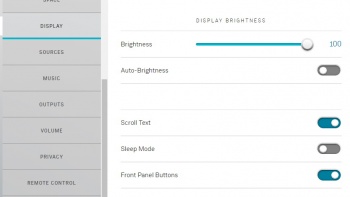
|
