Difference between revisions of "Template:Info:Spotify"
m |
m (→WiiM solution to Spotify Lossless) |
||
| Line 1: | Line 1: | ||
{| style="float:centre; border:1px solid black; | {| style="float:centre; border:1px solid black; | ||
| + | |- | ||
| + | {| style="float:right; border:1px solid black" | ||
|- | |- | ||
=== WiiM solution to Spotify Lossless === | === WiiM solution to Spotify Lossless === | ||
| − | | | + | |- |
| + | |As solution for <b>Spotify lossless</b> for Linn DSM's, you can use a <span class="plainlinks">[https://www.wiimhome.com/ <U><b>WiiM media streamer </b></u>]</span>. <br> | ||
<u><b>Note: This will ONLY work with Linn DSM, not Linn DS.</b></U> | <u><b>Note: This will ONLY work with Linn DSM, not Linn DS.</b></U> | ||
<br><br> | <br><br> | ||
| Line 17: | Line 20: | ||
::b) .<b>Audio Output</b>: | ::b) .<b>Audio Output</b>: | ||
:::i) Change to <b>Optical Out</b> | :::i) Change to <b>Optical Out</b> | ||
| − | + | <br><br> | |
To use the WiiM with the Linn DSM and Spotify: | To use the WiiM with the Linn DSM and Spotify: | ||
:1. Select the TOSLINK input on the Linn DSM | :1. Select the TOSLINK input on the Linn DSM | ||
:2. Open Spotify and <b>Connect</b> to the <b>WiiM ***</b> or the name you have given the WiiM. | :2. Open Spotify and <b>Connect</b> to the <b>WiiM ***</b> or the name you have given the WiiM. | ||
| − | :3. Double check, in your Spotify User profile setting that <i><b>"Audio Streaming quality"</b></i> is set to <b>Lossless, Up to 1GB/hr<b> | + | :3. Double check, in your Spotify User profile setting that <i><b>"Audio Streaming quality"</b></i> is set to <b>Lossless, Up to 1GB/hr</b> |
| − | :4. Now play Spotify music | + | :4. Now play Spotify music. |
| + | <br><br> | ||
|} | |} | ||
Revision as of 14:24, 17 December 2025
WiiM solution to Spotify Lossless
| As solution for Spotify lossless for Linn DSM's, you can use a WiiM media streamer . Note: This will ONLY work with Linn DSM, not Linn DS.
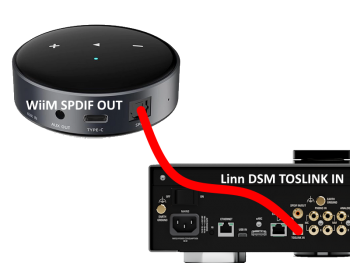
Set up of the WiiM for use with the Linn DSM is easy
|
