Template:Info:Spotify
WiiM solution to Spotify Lossless, Amazon Music, (also ChromeCast, Tidal Connect...)
Currently, a solution for Spotify lossless on the Linn DSM's, or Amazon Music for older products, you can use a WiiM media streamer .
This can also be used for other unsupported services such as CHROMECAST, Tidal Connect..., but check if your WiiM variant supports your service first WiiM Support .
This setup will play at the quality of your Linn DSM – playback uses the Linn DSM’s audio clock, meaning that jitter from the source device’s clock will be removed.
Note: This will ONLY work with Linn DSM, not a Linn DS.
Plug a TOSLINK optical cable from the WiiM media streamer SPDIF OUT digital output directly into a Linn DSM TOSLINK digital input, and use the superior audio DAC of the Linn DSM. This will give you the full Spotify lossless, and any other WiiM supported streaming services into the Linn DSM.
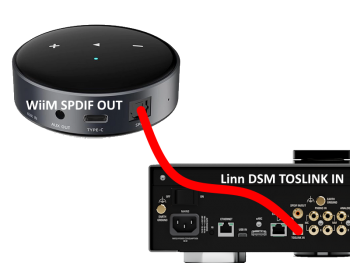
Set up of the WiiM for use with the Linn DSM is easy
- 1. On the WiiM control app, go into Devices, select your WiiM and the select the gear cog on the bottom right, this will bring you into the WiiM setup page.
- 2. In the Sound submenu:
- a).Audio Settings:
- i) We would advise turning "Fixed Volume Output:" ON. This will give the Linn DSM full volume control options
- ii) Optical Output Resolution: (Spotify Lossless is ONLY 44.1kHz but the higher sample rate will do other Streaming services)
- set to "Sample rate:" 192kHz & Bit depth: 24bit for newer products
- or "Sample rate:" 96kHz & Bit depth: 24bit on earlier products
- set to "Sample rate:" 192kHz & Bit depth: 24bit for newer products
- b) .Audio Output:
- i) Change to Optical Out
- a).Audio Settings:
To use the WiiM with the Linn DSM and Spotify:
- 1. Select the TOSLINK input on the Linn DSM
- 2. Open Spotify and Connect to the WiiM *** or the name you have given the WiiM.
- 3. Double check, in your Spotify User profile setting that "Audio Streaming quality" is set to Lossless, Up to 1GB/hr
- 4. Now play Spotify music.
To use the WiiM with the Linn DSM and Amazon Music:
- 1. Select the TOSLINK input on the Linn DSM
- 2. Go to the Browse tab on WiiM app and select Amazon Music from the Music Services section.
- 3. This will open your Amazon login page. Sign in with your Amazon Music account.
- 4. Open Amazon Music Settings and toggle on Amazon Music HD/UHD
- 5. Now play Amazon Music.
