LinnApp:IOS Security
- .iPhone/iPad IOS 14.5 firmware onwards and MAC macOS15 onwards with Linn App versions up to Linn App V 4.2.26 has Linn DS/DSM discovery issues. This has been fixed in Linn App 4.2.27 onwards.
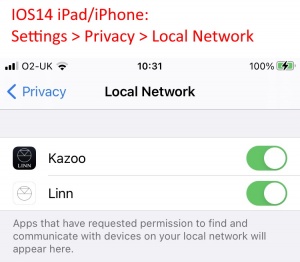
IOS14 has added security settings that may not have been updated to allow the Linn App to see what is on your local network.
This setting for enabling / disabling local access is under your iPhone/iPad
Settings > Privacy & Security > Local Network and the user can toggle OFF>ON the Linn access to the local network.
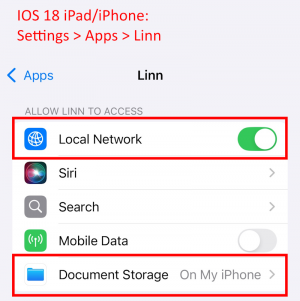
IOS 18, and IOS18 updates has more security and due to iCloud encryption changes may affect operation.
The setting to check/change are in Settings > Privacy & Security > Linn
- Local Network is switched ON &
- Document Storage is set to "On My iPhone" or "On My iPad"
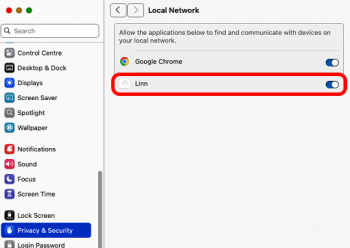
macOS Sequoia v15 / Tahoe v26..., and updates, have more local network privacy. If this is not enabled on the MAC, then this will affect the Linn App operation.
The setting to check/change are in ,
- for Sequoia Settings > Apps > Linn Local Network is switched ON
- for Tahoe Settings > Privacy & Security > Local Network > Linn App is switched ON