Difference between revisions of "Info:Basic Dial"
m |
m |
||
| (One intermediate revision by the same user not shown) | |||
| Line 27: | Line 27: | ||
:* Software version | :* Software version | ||
| − | ::# With the | + | ::# With the Linn DSM out of Sleep mode |
::# Press dial '''UP''' to enter Service menu | ::# Press dial '''UP''' to enter Service menu | ||
::# Scroll '''UP/DOWN''' to highlight "Software Update" | ::# Scroll '''UP/DOWN''' to highlight "Software Update" | ||
::# Press '''RIGHT''' to select or '''LEFT''' to ''cancel'' Service menu | ::# Press '''RIGHT''' to select or '''LEFT''' to ''cancel'' Service menu | ||
| − | :* | + | :* Linn DSM "Properties" (Room name, device name, IP address etc) |
::# Press dial '''UP''' to enter Service menu | ::# Press dial '''UP''' to enter Service menu | ||
::# Scroll '''DOWN''' to highlight "Properties" | ::# Scroll '''DOWN''' to highlight "Properties" | ||
| Line 40: | Line 40: | ||
| − | :* | + | :* Linn DSM "Settings" (Balance, Lipsync, Surround volumes etc) |
::# Press dial '''UP''' to enter Service menu | ::# Press dial '''UP''' to enter Service menu | ||
::# Scroll '''DOWN''' to highlight "Settings" | ::# Scroll '''DOWN''' to highlight "Settings" | ||
Latest revision as of 07:55, 23 February 2026
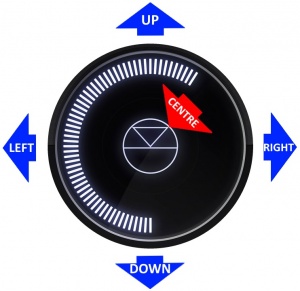
- GO INTO SLEEP:
- Press the dial CENTRE and continue to press the CENTRE (approx 2seconds) until the volume indicator dial starts to decrease.
- BRING OUT OF SLEEP:
- Press any of the UP/DOWN/LEFT/RIGHT or CENTRE of the dial.
- SOURCE SELECT
- Press the dial DOWN to list the inputs available menu
- Scroll UP/DOWN the selection.
- Press RIGHT to select source or LEFT to cancel selection menu
- PLAY/STOP/PAUSE- MUTE/UNMUTE
- A quick press of the dial CENTRE will toggle between PLAY and STOP/PAUSE
- (Radio-PLAY/STOP, Playlist-PLAY-PAUSE).
- (Other sources-Mute/Unmute).
- TRACK/PRESET PREV/NEXT
- A quick press of the dial LEFT/RIGHT jump to Playlist tracks or Radio stations.
- Volume
- Rotate dial clockwise to increase volume, anti-clockwise to reduce volume. The dial indicators will tell you the present volume.
- LINN DSM INFORMATION
- Software version
- With the Linn DSM out of Sleep mode
- Press dial UP to enter Service menu
- Scroll UP/DOWN to highlight "Software Update"
- Press RIGHT to select or LEFT to cancel Service menu
- Linn DSM "Properties" (Room name, device name, IP address etc)
- Press dial UP to enter Service menu
- Scroll DOWN to highlight "Properties"
- Press RIGHT to select Properties
- Scroll DOWN to highlight "Device"
- Press RIGHT to select Device
- Linn DSM "Settings" (Balance, Lipsync, Surround volumes etc)
- Press dial UP to enter Service menu
- Scroll DOWN to highlight "Settings"
- Press RIGHT to select or LEFT to cancel Settings menu
Note: Cancel any previous menus by pressing LEFT key.
