
Selekt DSM /0 Classic Hub
|
Linn Selekt DSM Integrated digital music player with selektable pre-amplifier and power amplifiers Optional 
⊕ Versions:
If using Organik DAC's then ALL cartridges MUST use the Organik DAC
|
| ||||||||||||||||||||||||||||||||||


Product info
| • Product Name: |
Selekt DSM: Classic Hub
|
| • Date of Introduction: | October 2022- September 2024
|
| replaced by Selekt Classic hub/1
| |
| • Type: | Integrated digital music player and preamplifier
|
|
|
⊕ Versions:
| • Selekt DSM with NO cartridges | |
| • Selekt DSM with Line-level analogue outputs cartridge | |
| • Selekt DSM with internal power amplifer cartridge | |
• Selekt DSM with  Stereo Line-level analogue cartridge | |
| • Selekt DSM with Stereo power amplifier cartridge
| |
• Selekt DSM with  Stereo Line-level analogue cartridge | |
| • Selekt DSM with Stereo power amplifier cartridge
| |
| • Selekt DSM with Mono Line-level analogue cartridge
| |
| • The version currently fitted can be checked HERE |
If using Organik DAC's then ALL cartridges MUST use the Organik DAC
- Features
- Optional
 Digital to Analogue Converters
- Organik DAC plays up to 384k-24bit files from streamed ethernet sources.
- Optional Digital to Analogue Converters
- Digital streaming via Bluetooth, Wi-Fi, USB , Airplay Airplay2 support
- Exakt system
- HDMI-2
- Surround Sound
- DSD Support (Only available on Selekt DSM cartridge outputs.)
- DS Design
- Utopik Power Supply
 Approved Control Profile
Initial Configuration
The Selekt DSM (Original & Classic/0) can take multiple cartridges and modules, so it can be configured to suit your system. You can change or add to these in the future, but please tell your Linn retailer what you need before you buy.
Before installation
Make sure that you have:
- A mains power socket with a stable supply of 100–120 V or 200–240 V (RMS), 50–60 Hz.
- A wired Ethernet connection to your broadband router, which is needed for setup and configuration. Once setup is complete, you can switch to Wi-Fi if you prefer. The Selekt DSM (Original & Classic/0) uses either a wired or a Wi-Fi connection, never both: while an Ethernet cable is connected, it ignores Wi-Fi, so unplug the cable once Wi-Fi is set up.
- Suitable HDMI cables from your TV, and from any HDMI sources if you have the Selekt HDMI switching module. They should not be too long, and should be certified to the correct specification.
 Linn recommend using Premium High Speed Certified HDMI cables for an optimal experience.
- Adequate ventilation around the product.
- The required cartridges and modules have been supplied
Cartridge description
As the Selekt DSM is modular then these have to be fitted to the Selekt DSM. Some of these cartridges/modules are fitted when you order the Selekt product, but check what you have installed first using the Manage_Systems App
These cartridges and modules can be used to upgrade or change your Selekt DSM. After changing a cartridge or module, you will usually need to reconfigure the Selekt DSM in Manage Systems.
Every output cartridge must be fitted with a DAC module. The single-channel line-out cartridge can only use the Organik Mono DAC module (see the modules table below).
| Cartridge | What it does |
|---|---|
| Single-channel line-out cartridge | One line-level pre-amplifier output, for mono playback. Must be used in pairs using both Slot 1 & Slot 2, and must be fitted with the Organik Mono DAC module. Can be used for surround: the Selekt DSM can only use one pair of these cartridges with slot 3 left empty. (That is, Slot 3 cannot be used with another cartridge in this state.). The remaining surround channels must be assigned to ExaktBoxes or Exakt loudspeakers. |
| 2-channel line-out cartridge | Two line-level pre-amplifier outputs, for stereo or for two surround channels. |
| 2-channel power amplifier cartridge | Two power amplifier outputs, for stereo, bi-amping, tri-amping or two surround channels. |
| Hybrid cartridge | One power amplifier output for a centre speaker, and one line-level output for a subwoofer. Designed for surround systems that also use Selekt power amplifier cartridges. |
| Module | What it does |
|---|---|
| Standard DAC module | DAC module using the standard Selekt DAC. For all cartridges except the single-channel line-out cartridge. |
| Katalyst DAC module | DAC module using the Katalyst DAC. For all cartridges except the single-channel line-out cartridge. |
| Organik DAC module | DAC module using the Organik DAC. For all cartridges except the single-channel line-out cartridge. |
| Organik Mono DAC module | Mono version of the Organik DAC module. The only DAC module for the single-channel line-out cartridge. |
| HDMI switching module | Adds HDMI inputs and switching. |
| Linn Surround Module | Adds surround sound. Fitted to the HDMI switching module. |
Notes
- This list may not include every upgrade currently available. Your Linn retailer can confirm what's available now.
Warning: changing Selekt cartridges or modules
Applies to all Selekt DSM variants.
To reduce the risk of damage, unplug the Selekt DSM from the mains power supply before removing or inserting any cartridge or module.
Power supply
The power supply is a module that your Linn retailer can change. Early Selekt DSMs were available with one of two power supplies:
- A standard power supply, suitable for line-out cartridges only.
- A large power supply, needed if a power amplifier cartridge or an HDMI switching module is fitted.
The large power supply later became the default, and was then replaced by the Utopik power supply. If you have an early Selekt DSM with the standard power supply and want to add a power amplifier cartridge or an HDMI switching module, ask your Linn retailer about upgrading the power supply.
Cartridge configuration validator
Configuration rules
- Every cartridge needs a DAC module fitted to produce audio, and a DAC module can only be fitted inside a cartridge.
- DAC modules: Standard (level 1), Katalyst (level 2), Organik Stereo (level 3) and Organik Mono (level 3).
- The 1Ch Line Out (mono) cartridge only takes the Organik Mono DAC module, and the Organik Mono DAC module only fits the 1Ch Line Out cartridge.
- 1Ch Line Out cartridges are fitted as a pair, one for each channel. When they are fitted, slot 3 must be left empty.
- Organik DAC modules can't be combined with Standard or Katalyst DAC modules in the same Selekt DSM. Use Organik in every cartridge, or in none.
- Organik Stereo and Organik Mono DAC modules can't be combined in the same Selekt DSM.
- At least one output cartridge is needed, otherwise the Selekt DSM has no analogue or speaker outputs.
- The configurator doesn't check the power supply. Early Selekt DSMs with the standard power supply need a power supply upgrade before a power amplifier cartridge or HDMI switching module can be fitted.
- Slot 1 is outer back corner slot
- Slot 3 is the inner most slot
Unpacking
- Remove the Selekt DSM from the packing and check you have all of the accessories.
- If you purchased any extra module/cartridge then please make sure that these have been installed correctly BEFORE placing your Selekt DSM in to its final location.
System design
The core of the Selekt DSM is the Selekt DSM Hub.
If you will only use any Selekt DSM (Original, Classic or Edition) with Exakt loudspeakers or ExaktBoxes, you don't need any cartridges or modules, because Exakt products receive their audio digitally through Exakt Link. The only exception is if you want to use the Selekt DSM Edition Original/Classic/Edition as an HDMI switcher, which needs the HDMI switching module.
Wiring
- This is all dependent on cartridges and modules that are installed in your Selekt DSM.
Important: the Selekt power amplifier outputs are Class-D amplifiers. Only connect or disconnect loudspeakers when the Selekt DSM is in sleep mode or switched off.
Notes
- Some electrostatic loudspeakers may need a modification to work with Linn Class-D amplifiers. Check the loudspeaker manufacturer's website for details.
- The Selekt power amplifiers have a slightly lower gain than other Linn power amplifiers, such as the original Majik and Akurate amplifiers. If you are bi-amping a pair of loudspeakers, use either all Selekt power amplifier cartridges, or all Selekt line-level cartridges driving external amplifiers.
BACKPANELS
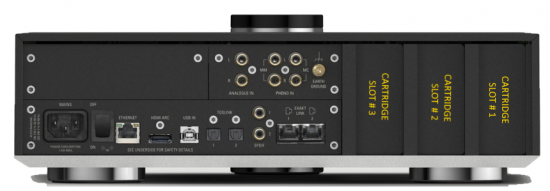
- Cartridge(s) must be fitted on the order;
- Slot#1 the first cartridge,
- Slot#2 for the second cartridge, if required and
- Slot#3 for the third cartridge, if required.
Selekt DSM with one Line-level cartridge backpanel
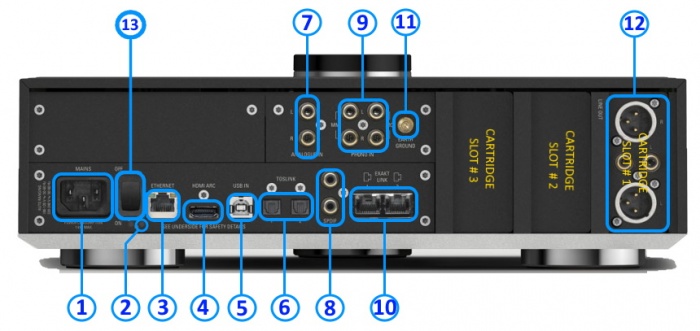
- MAINS INPUT - To connect to the mains electricity supply.
- FALLBACK - To put the device into Fallback mode (used when reprogramming)
- ETHERNET - To connect to a network (100Base-T)
- HDMI ARC: connects to your TV's HDMI ARC (Audio Return Channel) socket, so you can play TV sound through the Linn Selekt DSM.
- USB-B socket - To connect to a PC/MAC for Class 2.0 PCM Asynchronous USB Audio playback
- Optical digital inputs (Toslink): connect sources with Toslink (optical) digital outputs.
- Analogue inputs (RCA, line level): connect sources with RCA analogue outputs, such as a CD player.
- S/PDIF digital inputs (RCA): connect sources with S/PDIF digital outputs. One socket can be configured as an S/PDIF digital output instead.
- Phono inputs (RCA, MM/MC): connect a turntable with RCA outputs. Suitable for moving magnet (MM) and moving coil (MC) cartridges.
- EXAKT LINK - To connect to Exakt compatible devices (Exaktbox, Exakt Speakers, Urika II etc)
- Phono ground: connects to your turntable's earth (ground) terminal.
- Analogue outputs (XLR and RCA, variable level): connect to a separate power amplifier.
- Power switch: mains power switch.
Analogue and phono inputs
- Analogue inputs: input sensitivity selectable: 1, 2 or 4 V RMS; 50 kΩ input impedance.
- Analogue and phono inputs are converted to digital at 192 kHz / 24-bit.
- Phono input, MM: 47 kΩ, 100 pF input impedance; maximum input 67 mV RMS at 1 kHz; gain +40 dB.
- Phono input, MC: 100 Ω, 470 pF input impedance; maximum input 5.5 mV RMS at 1 kHz; gain +54 dB.
Analogue outputs
- RCA: 2 V RMS, 300 Ω
- XLR: 4 V RMS, 600 Ω
USB input
- Supported sample rates: 44.1, 48, 88.2, 96, 176.4 and 192 kHz.
Digital inputs
- Supported sample rates: 32, 44.1, 48, 88.2, 96, 176.4 and 192 kHz.
- The S/PDIF 1 socket can be configured in Manage Systems as a 2-channel S/PDIF digital output, at up to 192 kHz:
- The output is fixed volume.
- It carries the front left and right channels only, even when playing surround audio.
- The S/PDIF 2 socket is always an input. It can't be configured as an output.
Selekt DSM with one Power Amplifier cartridge
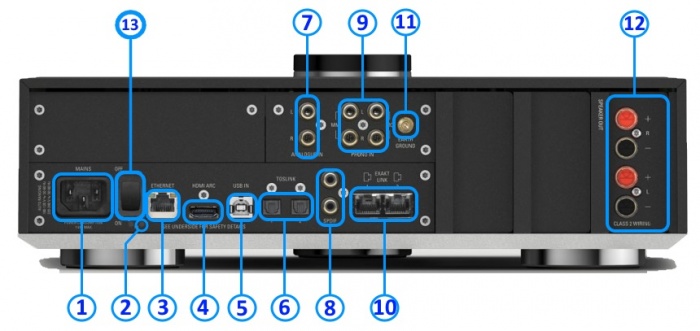
- MAINS INPUT - To connect to the mains electricity supply.
- FALLBACK - To put the device into Fallback mode (used when reprogramming)
- ETHERNET - To connect to a network (100Base-T)
- HDMI ARC: connects to your TV's HDMI ARC (Audio Return Channel) socket, so you can play TV sound through the Selekt DSM.
- USB-B socket - To connect to a PC/MAC for Class 2.0 PCM Asynchronous USB Audio playback
- Optical digital inputs (Toslink, 2 sockets): connect sources with Toslink (optical) digital outputs.
- Analogue inputs (RCA, line level): connect sources with RCA analogue outputs, such as a CD player.
- S/PDIF digital inputs (RCA, 2 sockets): connect sources with S/PDIF digital outputs. The S/PDIF 1 socket can be configured as an S/PDIF digital output instead.
- Phono inputs (RCA, MM/MC): connect a turntable with RCA outputs. Suitable for moving magnet (MM) and moving coil (MC) cartridges.
- Exakt Link: connects to Exakt devices, such as ExaktBoxes, Exakt loudspeakers and the Urika II.
- Phono ground: connects to your turntable's earth (ground) terminal.
- Power amplifier outputs (4 mm): connect directly to a pair of loudspeakers.
- Power switch: mains power switch.
Important: the power amplifier outputs are Class-D amplifiers. Only connect or disconnect loudspeakers when the Selekt DSM is in sleep mode or switched off.
Analogue and phono inputs
- Analogue inputs: input sensitivity selectable: 1, 2 or 4 V RMS; 50 kΩ input impedance.
- Analogue and phono inputs are converted to digital at 192 kHz / 24-bit.
- Phono input, MM: 47 kΩ, 100 pF input impedance; maximum input 67 mV RMS at 1 kHz; gain +40 dB.
- Phono input, MC: 100 Ω, 470 pF input impedance; maximum input 5.5 mV RMS at 1 kHz; gain +54 dB.
Power amplifier outputs
- Maximum 100 W into 4 Ω, or 50 W into 8 Ω, per channel. Gain 20 dB.
- The Selekt power amplifiers have a lower gain than other Linn power amplifiers, such as the Majik and Akurate amplifiers. When bi-amping, do not mix Selekt power amplifier cartridges and external amplifiers: use either all Selekt power amplifier cartridges, or all Selekt line-level cartridges driving external amplifiers.
- Some electrostatic loudspeakers may need a modification to work with Linn Class-D amplifiers. Check the loudspeaker manufacturer's website for details.
USB input
- Supported sample rates: 44.1, 48, 88.2, 96, 176.4 and 192 kHz.
Digital inputs
- Supported sample rates: 32, 44.1, 48, 88.2, 96, 176.4 and 192 kHz.
- The S/PDIF 1 socket can be configured in Manage Systems as a 2-channel S/PDIF digital output, at up to 192 kHz:
- The output is fixed volume.
- It carries the front left and right channels only, even when playing surround audio.
- The S/PDIF 2 socket is always an input. It can't be configured as an output.
Single Amp, Bi-Amp and Tri-Amp configurations
These examples show how to wire a passive loudspeaker system to the Selekt DSM using different amplifier configurations.
Before wiring, set the loudspeaker configuration:
- In Linn Account, open Manage Systems.
- Go to the General tab and open the Network Player page.
- Select Change Configuration and choose the Stereo Pass-Through loudspeaker.

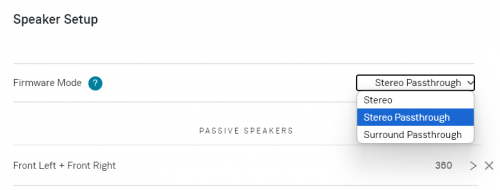
Important: loudspeaker shorting links
- In Bi-Amp and Tri-Amp setups, each Selekt power amplifier output drives one loudspeaker crossover section directly.
- All shorting links or bridging strips on the loudspeaker back panel must be removed for these setups. If they are left in place, the amplifier outputs will be connected together.
- Ask your Linn Retailer to check that the links and wiring are correct before use.
- Single Amp
Requires: one Selekt power amplifier cartridge, one DAC module and single-wired speakers.
- Ensure all standard shorting links are fitted to the loudspeakers
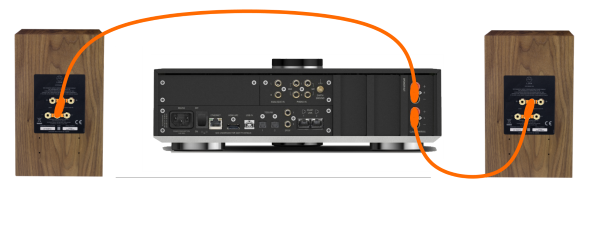
- Bi-Amp
Requires: two Selekt power amplifier cartridges and two DAC modules.
- Remove all shorting links on the loudspeakers so that each amplifier drives its loudspeaker section directly.
- If no HDMI switching module is fitted, the Selekt DSM automatically configures each amplifier cartridge to output both Left and Right channels.
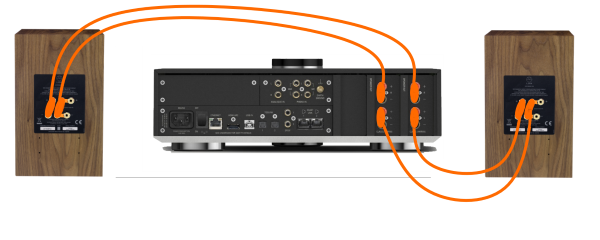
- Tri-Amp
Requires: three Selekt power amplifier cartridges and three DAC modules.
- Remove all shorting links on the loudspeakers so that each amplifier drives its loudspeaker section directly.
- If no HDMI switching module is fitted, the Selekt DSM automatically configures each amplifier cartridge to output both Left and Right channels.
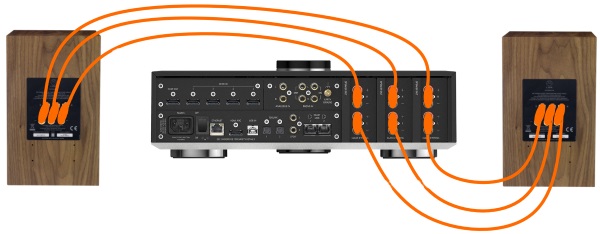
Notes
- This is not an Exakt setup. All Selekt power amplifier and line-level outputs are full range. The loudspeaker's own passive crossover splits the signal.
- No HDMI switching module is required for these setups.
- Every Selekt power amplifier or line-level cartridge needs its own DAC module. Two cartridges need two DAC modules, and three cartridges need three.
- Do not mix Selekt power amplifier cartridges with Selekt line-level cartridges in any multi-amp system (Bi-Amp, Tri-Amp or larger). The reason is gain. The Selekt integrated power amplifier has lower gain than any other Linn amplifier. If a line-level cartridge feeds an external amplifier alongside it, the loudspeaker sections will receive mismatched levels.
How do I set up Exakt on a Selekt DSM?
The Selekt DSM has a stereo 3-way Exakt Engine, so it can be used as a 2-way or 3-way Exakt crossover.
Setting the loudspeaker configuration
- In Linn Account, open Manage Systems.
- Go to the General tab and open the Network Player page.
- Select Change Configuration, then select the loudspeaker you are using.
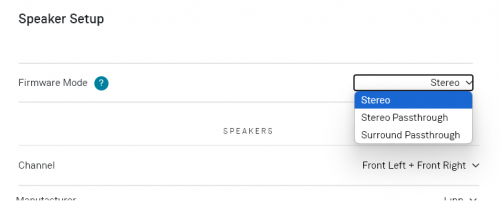
Example wiring: tri-amping
Each Selekt power amplifier output drives one loudspeaker drive unit.
Important: the loudspeakers must be made externally Exakt, and any shorting links or bridging strips across the loudspeaker back panel must be removed to suit the amplifier and speaker wiring. Ask a Linn retailer to do this, to make sure it is done correctly.
Notes
- The loudspeakers must be configured for Exakt operation.
- The connection information is shown in Manage Systems, on the General tab.
- You can use either Line-level or Power amplifier Selekt cartridges, but not a mix of both (see below).
- No HDMI switching module is needed for this setup.
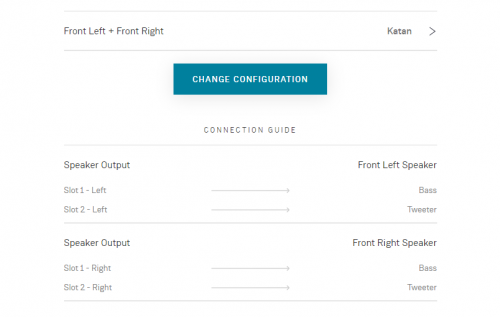
Do not mix Selekt power amplifier cartridges and Selekt Line-level cartridges in a bi-amp, tri-amp or quad-amp system. The Selekt power amplifier has a lower gain than other Linn amplifiers, so the signals reaching the loudspeaker inputs from the Selekt power amplifier and from an external power amplifier would not match in volume.
How do I set up Surround on a Selekt DSM?
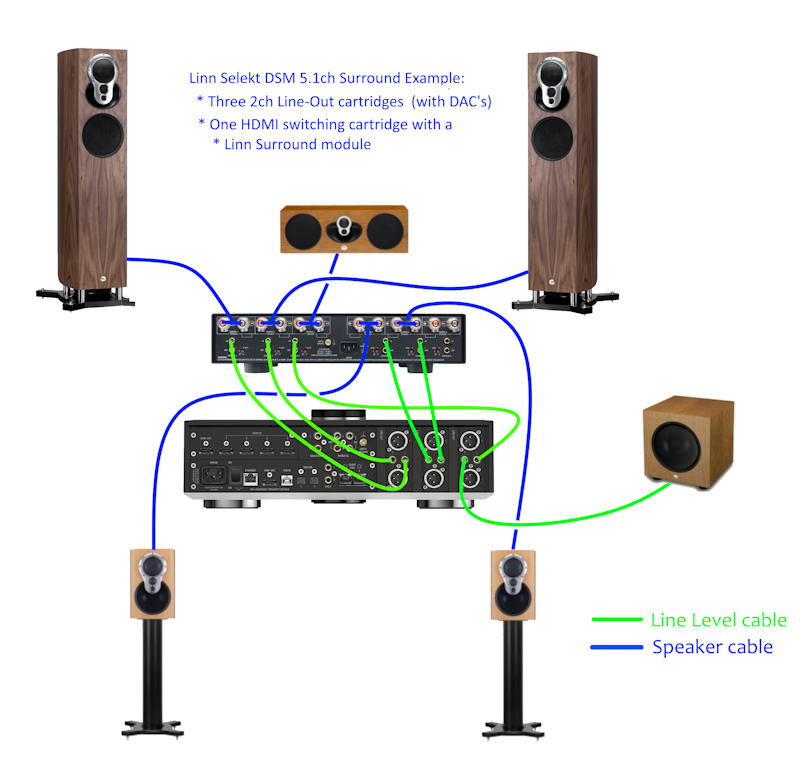
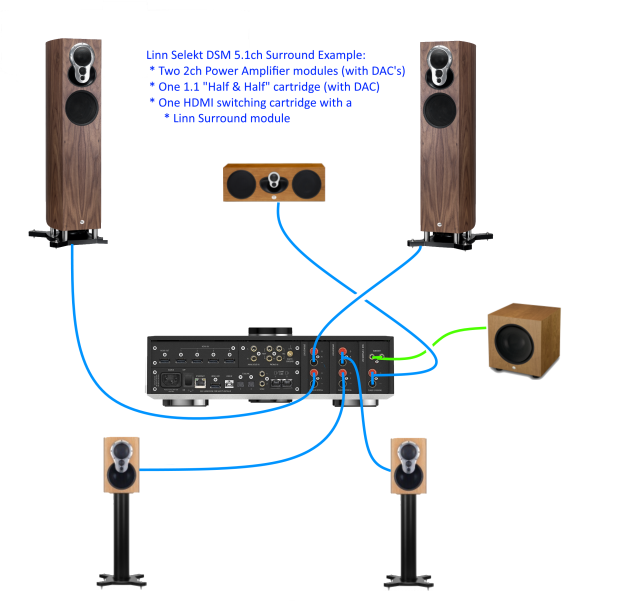
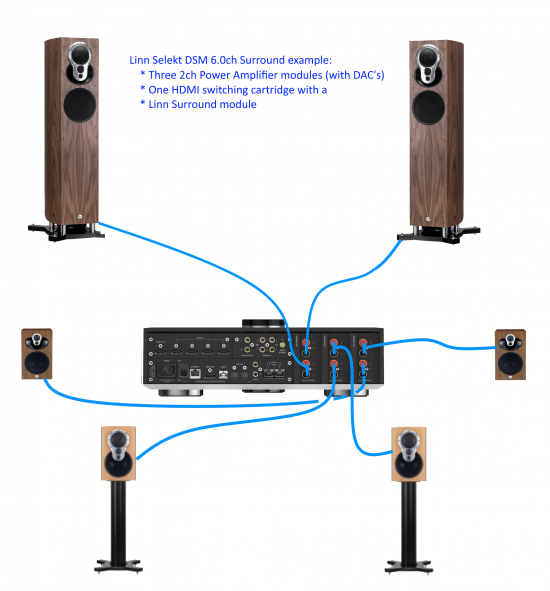
Selekt DSM with 5.1 surround, using Power amplifier or Line Out cartridges, an HDMI module and the Linn Surround Module
The configurations below are examples only. They show typical Linn systems to illustrate how the Selekt DSM connects. They are not the only supported configurations, and the Linn products shown can be replaced with other suitable amplifiers, Exaktboxes and loudspeakers.
- All the loudspeakers are driven by Selekt Power amplifier cartridges, or by Selekt Line Out cartridges.
- In Manage Systems, set Configuration to Surround Pass-through. See the Manage Systems manual for details.
- The subwoofer is fed from the LFE (subwoofer) channel of a cartridge. The Linn Surround Module is fitted to the HDMI switching module.
Note: in a surround setup, the subwoofer is always fed from a cartridge. The subwoofer output on the back panel of the Selekt DSM Edition and Selekt Classic DSM /1 is not used, as it only works in a stereo playback configuration. (The original Selekt DSM has no back-panel subwoofer output.)
| Slot | Using Power amplifier cartridges | Using Line-level cartridges |
|---|---|---|
| 1 (outer) | Hybrid cartridge, for the centre speaker and subwoofer | 2ch Line Out cartridge, for the centre speaker and subwoofer |
| 2 (middle) | Power amplifier cartridge, for the surround left and right speakers | 2ch Line Out cartridge, for the surround left and right speakers |
| 3 (inner) | Power amplifier cartridge, for the front left and right speakers | 2ch Line Out cartridge, for the front left and right speakers |

The setup in Manage Systems:
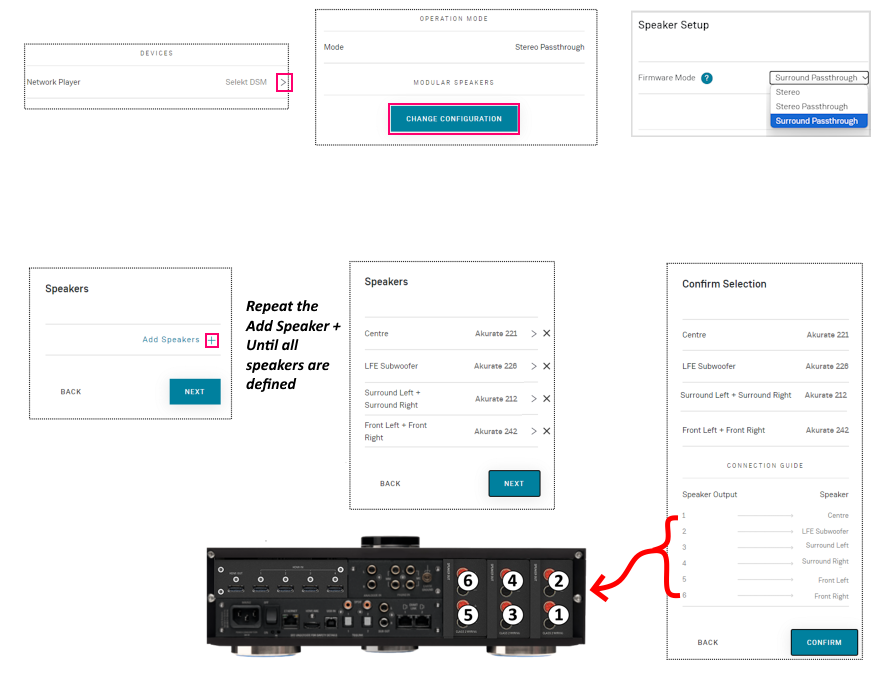
Selekt DSM with 5.1 surround, using mixed cartridges, an HDMI module and the Linn Surround Module
Up to three cartridges can be fitted to a Selekt DSM, and different cartridge types can be mixed in the same Selekt DSM. For the best performance in a surround setup with mixed cartridges, we suggest:
| Slot | Cartridge | Speakers |
|---|---|---|
| 1 (outer) | Hybrid cartridge | Centre speaker and subwoofer |
| 2 (middle) | Power amplifier cartridge | Left and right speakers: either the front or the surround pair |
| 3 (inner) | Analogue output cartridge | Left and right speakers: whichever pair slot 2 isn't driving |
- Selekt DSM and Selekt Classic DSM /0
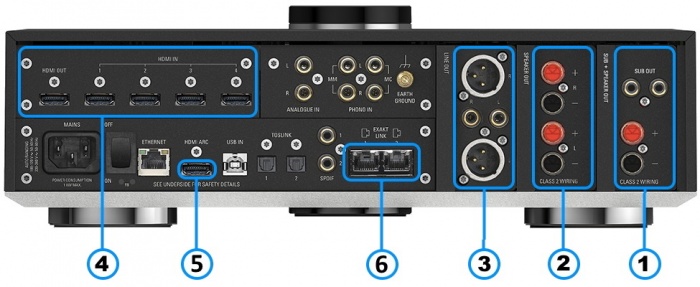
- Hybrid cartridge (4 mm and RCA): a power amplifier output for a centre loudspeaker, and two RCA sockets for one or two subwoofers.
- Power amplifier cartridge (4 mm): connects directly to a pair of loudspeakers.
- Analogue output cartridge (XLR and RCA): connects to a separate power amplifier.
- HDMI switching module: adds HDMI inputs and switching to the Selekt DSM.
- HDMI ARC (Audio Return Channel, which sends sound from your TV to the Selekt DSM over the HDMI cable): not used when an HDMI switching module is fitted. HDMI ARC then moves to the HDMI OUT socket on the switching module.
- Exakt Link: connects to Exakt devices, such as ExaktBoxes, Exakt loudspeakers and the Urika II. This means you can use Exakt loudspeakers and ExaktBoxes as well as, or instead of, the cartridge outputs.
Important: the Selekt power amplifier outputs (on the Hybrid and Power amplifier cartridges) are Class-D amplifiers. Only connect or disconnect loudspeakers when the Selekt DSM is in sleep mode or switched off.
All cartridges
- Every cartridge needs a DAC module: Standard, Katalyst or Organik. Organik DAC modules can't be mixed with the other types: if one cartridge uses an Organik DAC module, they all must.
- All cartridges share the Selekt DSM's volume control. When you change the volume, every cartridge output changes with it.
Analogue outputs (Analogue output cartridge)
- RCA: 2 V RMS, 300 Ω
- XLR: 4 V RMS, 600 Ω
Power amplifier outputs (Hybrid and Power amplifier cartridges)
- Maximum 100 W into 4 Ω, or 50 W into 8 Ω, per channel. Gain 20 dB.
- The Selekt power amplifiers have a slightly lower gain than other Linn power amplifiers, such as the Majik and Akurate amplifiers. If you are bi-amping a pair of loudspeakers (using separate amplifier channels for the bass and treble drive units), use either all Selekt power amplifier cartridges, or all Selekt line-level cartridges driving external amplifiers.
- In surround mode, the gain of each channel can be adjusted to compensate for this difference.
- Some electrostatic loudspeakers may need a modification to work with Linn Class-D amplifiers. Check the loudspeaker manufacturer's website for details.
More surround options
More surround configurations are shown in the Surround Sound section.
Example 1: 5.1 surround using three Line-level cartridges
Example 2: 5.1 surround using Power amplifier cartridges and a 1.1 cartridge
Example 3: 6.0 surround using Power amplifier cartridges
Download App
- Linn App
Linn DS/DSM is best controlled using the Linn mobile app

or

Setup and changes
Bluetooth & Wifi
Bluetooth and Wifi features are available for Selekt DSMs running Davaar 75 or later firmware
You can set up Wi-Fi and Bluetooth quickly using the Pin buttons or the Selekt dial. Wi-Fi can also be set up using a web browser, or in Manage Systems..
Setting up Bluetooth using the Pin buttons
- On your phone, tablet or computer, open the Bluetooth settings, ready for pairing.
- On the Selekt DSM, press and hold Pins 3 and 4 together until "Bluetooth: Pairing..." appears on the front panel display.
- On your device, select the Selekt DSM from the list of available Bluetooth devices.
The paired device is then available on the Selekt DSM as a streaming source.
Setting up Wi-Fi using the Pin buttons
- Unplug any Ethernet (LAN) cable from the Selekt DSM. It ignores Wi-Fi while a cable is connected.
- Press the WPS button on your broadband router.
- On the Selekt DSM, press and hold Pins 2 and 5 together until "WPS: Connecting..." appears on the front panel display.
The Selekt DSM should now connect to your Wi-Fi network automatically.
To make the Selekt DSM forget the Wi-Fi network, press and hold Pins 1, 2 and 5 together.
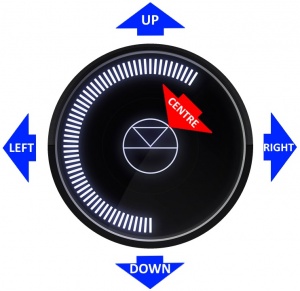
Setting up Bluetooth or Wi-Fi using the Selekt dial
- Wake the Selekt DSM from sleep mode.
- Press the dial up to open the Service menu.
- Scroll up or down to highlight Connect, then press right to select it.
- Scroll up or down to highlight the option you want, then press right to select it:
- Wifi (WPS): put your router into WPS mode first, and the Selekt DSM will connect automatically.
- Wifi (Reset): clears any previous Wi-Fi settings.
- Bluetooth Pair: set your Bluetooth device ready for pairing first. The paired device is then available as a streaming source.
To leave the Service menu, press left.
Setting up Wi-Fi using a web browser
- Wake the Selekt DSM from sleep mode, and unplug any Ethernet (LAN) cable.
- On your phone, tablet or computer, open the Wi-Fi settings.
- Find the Selekt DSM in the list of available networks. It is called "Selekt DSM - serial number".
- Select it to connect to it.
- Open a web browser on the same device, and type
https://setup.linn.co.ukin the address bar. The Selekt DSM Wi-Fi setup page opens. - Select the Wi-Fi network you want the Selekt DSM to use.
- Enter the password for that Wi-Fi network.
- Select Set Network.
If the setup page doesn't open, your phone or tablet's security settings may be blocking it. Check that:
- Any VPN on your phone or tablet is turned off.
- On an iPhone or iPad, the Linn DSM's network isn't set to join or log in automatically: go to Settings > Wi-Fi, tap the i next to the Selekt DSM network, and turn off Auto-Join and Auto-Login.
- On an iPhone or iPad, Wi-Fi location services are turned off:
- Go to Settings > Privacy > Location Services.
- Tap System Services, near the bottom of the page.
- Turn off Wi-Fi Networking (called Networking & Wireless on some versions).
- Try
https://setup.linn.co.ukagain.
Turn these settings back on once the Selekt DSM is set up, as they add security to your device.
Wifi can also be setup using the Manage Systems webpage as below
Configuring your Linn DS/DSM player/Speakers etc:
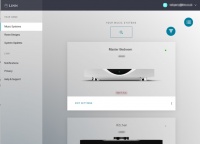
Before you do anything you will need to have a Linn Account. This is a simple process that can only be performed using the Linn App.
Details on how to create your Linn Account and how to use Manage systems can be found in the Manage Systems page.
Space Optimisation
- Linn Space Optimisation is a digital room-correction and acoustic modelling technology built into all Linn network music players and systems. It removes the unwanted distorting effects of your listening environment to reveal cleaner music.
How It Works
- Acoustic Modelling: Instead of using a calibration microphone, it uses mathematical and physical modelling to analyse how your speakers and room interact.
- Room Parameters: Scan your room using LinnDAR or enter your room dimensions, construction materials, ceiling shapes, and features like windows, doors, and furnishings into a web tool.
- Speaker Matching: Select your specific speaker model from a large database (supporting hundreds of models from both Linn and third-party brands).
- Low-Frequency Control: It targets frequencies below 80 Hz where room boundaries and dimensions cause energy peaks, muddy bass, and prolonged decay, cutting down that distortion.
- Practical vs. Ideal Placement: It allows you to place your speakers in practical positions for your living space while making them sound as though they are sitting in their acoustically ideal locations.
Detailed setup instructions are available HERE.
Using the Linn Selekt DSM
Top dial and front panel operation
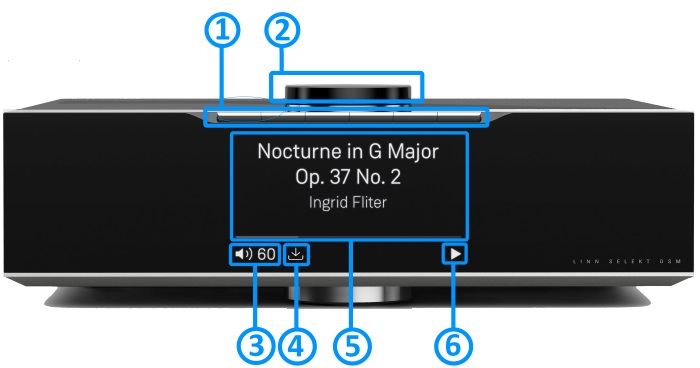
Front panel controls and indicators. Select one to jump to its description:
- 1. Pin buttons: personalised media selection, Pins 1 to 6
- 2. Control dial: main control dial and switch interface
- 3. Volume and mute indicators
- 4. Software update available indicator
- 5. Media information: the source name, track name or radio station you are on
- 6. Transport information: play, stop, pause, buffering or no network
1. Pin buttons
- Half-press a button (press it gently) to see what it will do.
- Press it fully to select that Pin.
To create Pins, see Create Pins in the Linn App manual.
2. Control dial
Go into sleep mode
Press and hold the centre of the dial for about 2 seconds, until the volume indicator starts to go down.
Wake from sleep mode
Press the dial up, down, left, right or in the centre.
Select a source
- Press the dial down to show the list of sources.
- Scroll up or down to the source you want.
- Press right to select it, or left to cancel.
Play, stop, pause or mute
Quickly press the centre of the dial. What it does depends on the source:
- Radio: play or stop.
- Playlist: play or pause.
- Other sources: mute or unmute.
Previous or next track or preset
Quickly press the dial left or right to move to the previous or next playlist track or radio station.
Volume
Turn the dial clockwise to turn the volume up, and anti-clockwise to turn it down. The lights around the dial show the current volume.
Linn DSM information and settings
All of these are in the Service menu. Wake the Linn DSM from sleep mode first, then press the dial up to open the Service menu. To leave any menu, press left.
Software version and updates
- Scroll up or down to Software Update.
- Press right to select it.
Properties (room name, device name, IP address and so on)
- Scroll down to Properties, and press right to select it.
- Scroll down to Device, and press right to select it.
Settings (balance, lip sync, surround volumes and so on)
- Scroll down to Settings.
- Press right to select it.
All of these are in the Service menu. Wake the Linn DSM from sleep mode first, then press the dial up to open the Service menu. In any menu, scroll with up and down, press right to select, and press left to go back.
Surround trim (adjusts the level of each surround channel)
- Scroll down to Settings, and press right to select it.
- Scroll up or down to Surround, and press right to select it.
- Scroll up or down to the channel you want to adjust, and press right to select it.
- Press up or down to change the channel's level.
 If you do not have a live network/LAN connection on the Selekt DSM the Linn symbol on the dial will go red.
- Note: check that the network cable is plugged into the Ethernet socket, not the Exakt Link socket, which looks similar.
 After a live network/LAN connection is made the LINN symbol on the dial will turn white after 5-10 seconds.

- This means that the Selekt DSM is in :
- Searching for Exakt speakers after being woken from Sleep (typically only flashes for a couple of seconds after waking from Sleep)
- or
- FALLBACK mode : Fallback is a state that means that the product is waiting for a software update. To stop this flashing either:

This shows that the Selekt DSM is in PAUSE mode. (This can only be seen on Playlist and streaming service sources, such as Qobuz, Tidal etc. It will not occur on Radio station playback.)
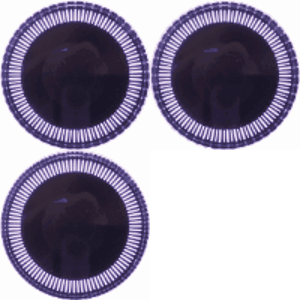
This is to show that the Selekt DSM is starting up after a mains power on. It will typically do this in 30–45 seconds, but if the Linn Selekt DSM is performing a software update, this may take a little longer.

This is to show when the Selekt DSM is in mute mode.
3. Volume and mute indicators
Shows the current volume level, and whether the sound is muted.
4. Software update available
Shows that a software update is available for your Selekt DSM.
- The update is not compulsory, just an indication that an update is available.
- A Software update is performed by:
- the dial settings to do a Software update,
- Press the UPPER part of the dial. The front panel display will now show System options.
- Press the LOWER part of the dial to highlight "SOFTWARE UPDATE"
- Press the RIGHT part of the dial to select this option.
- If a Software update is available you will see the agree to update message and pres the RIGHT part of the dial to select this option.
- The update is not compulsory, just an indication that an update is available.
- Manage Systems - Software Updates,
- IR handset or Linn App.
- Instructions on how to do this update are listed HERE
5. Media information
Press the i button on the IR remote handset to wake the display, then press it again to scroll through the information available.
- When playing from a playlist, this is typically the artist, album and codec. The lower bar shows the position in the track.
- When playing a radio source, this shows the information provided by the radio station, and the codec.
6. Transport information
Shows the current transport state: Play  , Stop
 , Pause
 or Buffering
 .
- This area is blank when a local input, such as HDMI, is selected.
- If the no network symbol
 appears, the Selekt DSM has lost its network connection. When the connection returns, the display goes back to its previous state.
Controlling your Linn DS/DSM using an infrared handset
Top Of Page Index
To control your Linn DS/DSM you can you the infra-red handset supplied with product as well as the Linn App.
The infra-red handset supplied has;-
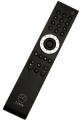
* Volume control, Mute
* Input control with PIN selection
* Radio station selection using the handset joystick,
* Playlist navigation using the handset joystick,
* Transport control (Play, Stop, Pause, Skip & Search) &
* Music information.
The Technical Specifications of the IR handset can be found HERE
Control of the Linn DS/DSM using a PC/MAC/Tablets & Phones
These manuals should only be used as a basic guide for what the buttons can do. We would recommend just using the App/Software and only using the guide if you are having difficulty or want to see what more features are available.
- Linn app for iPhone/iPad/Mac -:This is a Linn DS control software for Android phone, Android tablets, iPhone, iPad and M-Series Mac and replaced Kazoo.
- Spotify Connect Manual - How to play Spotify on a Linn DS/DSM
- Roon - "The music player for music lovers" control interface
Features
USB Stream

Using the Linn DSM as a USB sound card for Windows, Mac, iPhone and iPad
Bluetooth receiver

The Selekt DSM can play audio from a phone, tablet or computer over Bluetooth (version 4.2, SBC encoding). See the Bluetooth specification for details.
Tidal

Setting up and using Tidal with the Linn DS/DSM and Linn App
Qobuz

Setting up and using Qobuz with the Linn DS/DSM and Linn App
Calm Radio

Setting up and using Calm Radio with the Linn DS/DSM and Linn App
Spotify Connect

Setting up and using Spotify Connect with the Linn DS/DSM
Roon

Setting up Roon to work with the Linn DS/DSM
Deezer

Setting up and using Deezer with the Linn DS/DSM and Linn App
AirPlay

Using AirPlay with the Linn DS/DSM
Amazon Music

Setting up and using Amazon Music with the Linn DS/DSM and Linn App
Presto Music

Setting up and using Presto Music with the Linn DS/DSM and Linn App
AirPlay 2

Using AirPlay 2 with the Linn DS/DSM
HDMI-2

Using HDMI 2.0 with the Linn DSM
Help with HDMI issues
HDMI-ARC

Using HDMI ARC with the Linn DS/DSM
Help with HDMI issues
HDMI-eARC

Using HDMI eARC with the Linn DS/DSM
Help with HDMI issues
DSD

Using DSD with the Linn DS/DSM
Exakt technology

Exakt is Linn's system for keeping music digital for as long as possible. In a traditional hi-fi system, the signal is converted to analogue early on, then passes through cables, amplifiers and passive crossovers that each add noise and distortion. With Exakt, the signal stays digital all the way to the loudspeaker, where the crossover is done digitally, and the conversion to analogue happens at the last moment, just before the amplifiers driving each drive unit.
This makes the loudspeaker an intelligent, software-upgradeable product. Exakt can correct for small differences between drive units, and, with Space Optimisation, adapt the sound to your room.
Exakt Link connects your Linn network player to Exakt loudspeakers or ExaktBoxes with a single network cable (Cat 5 or better). This one cable carries up to 8 channels of audio, together with timing information that keeps every channel perfectly in step.
More about Exakt
- Exakt on linn.co.uk
- Klimax Exakt System
- Akurate Exakt System
- Akurate ExaktBox connections
- Klimax ExaktBox connections
- Exakt Link connections and cables
- Space Optimisation for Exakt systems
General products manuals and information
Top Of Page Index
Controlling the product User Guide
Product setup:Manage Systems user manual
Third Party Software Copyright
UPGRADE FEATURES
The Selekt DSM allows you to selekt cartridges to meet your requirements:
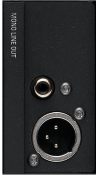
SELEKT DSM CARTRIDGE - 1Ch LINE OUT
Description
A cartridge with one line-level audio channel. These cartridges are sold and fitted in pairs, one for the left channel and one for the right. Each has an XLR and an RCA output. Both are always live and can be used at the same time, without affecting each other's performance.
DAC - Mono Digital to Analogue Convertor module option
| Option 3: | Organik (Level-3) |
Line Output:
| RCA: | |||
| Output Level: | 2V rms @volume 80 | ||
| Output Impedance: | 300Ω |
| XLR | |||
| Output Level: | 4V rms @volume 80 | ||
| Output Impedance: | 600Ω |
Notes
- A Selekt DSM can only use one pair of these cartridges, for two-channel output. When they are fitted, slot 3 can't be used.
- DAC modules are sold separately. This cartridge needs an Organik Mono (level 3) DAC module, which uses the higher-specification Organik DAC architecture. No other DAC module fits it.
Warning: changing Selekt cartridges or modules
Applies to all Selekt DSM variants.
To reduce the risk of damage, unplug the Selekt DSM from the mains power supply before removing or inserting any cartridge or module.
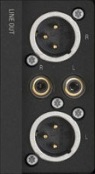
SELEKT DSM CARTRIDGE - 2Ch LINE OUT
Description
A cartridge with two line-level audio channels. Each channel has an XLR and an RCA output. Both are always live and can be used at the same time, without affecting each other's performance.
DAC - Stereo Digital to Analogue Convertor module options
This will allow you to select the audio performance of this cartridge.
| Option 1: | Standard (Level-1) |
| Option 2: | Katalyst (Level-2) |
| Option 3: | Organik (Level-3) |
Line Output:
| RCA: | |||
| Output Level: | 2V rms @volume 80 | ||
| Output Impedance: | 300Ω |
| XLR | |||
| Output Level: | 4V rms @volume 80 | ||
| Output Impedance: | 600Ω |
Notes
- DAC modules are sold separately. One DAC module must be fitted to the cartridge for it to produce audio.
- Choose one of three stereo DAC modules:
- Standard (level 1): the standard Selekt DAC.
- Katalyst (level 2): uses the higher-specification Katalyst DAC architecture.
- Organik (level 3): uses the higher-specification Organik DAC architecture.
- Each cartridge takes one DAC module. You can't fit two DAC modules in the same line-level, power amplifier or Hybrid cartridge.
- Standard and Katalyst DAC modules can be mixed: different cartridges in the same Selekt DSM can use different ones.
- Organik DAC modules can't be mixed with Standard or Katalyst DAC modules in the same Selekt DSM. Use Organik in every cartridge, or in none.
- The Organik Mono DAC module only fits the mono line-out cartridge, and that cartridge only takes the Organik Mono DAC module.
- Organik Stereo and Organik Mono DAC modules can't be mixed in the same Selekt DSM.
For example, a Standard DAC module in slot 1 and a Katalyst DAC module in slot 2 is fine, but an Organik DAC module in slot 1 and a Katalyst DAC module in slot 2 is not. To check a combination, use the Selekt cartridge options checker. To check that your cartridge and DAC combination is allowed, use the Selekt cartridge options checker.
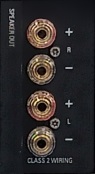
SELEKT DSM CARTRIDGE - POWER OUT
Description
A cartridge with two Class-D power amplifier channels. Each channel has 4 mm banana / binding post loudspeaker terminals.
DAC module options
A DAC (digital-to-analogue converter) module sets the audio performance of this cartridge.
| Option 1: | Standard (Level-1) |
| Option 2: | Katalyst (Level-2) |
| Option 3: | Organik (Level-3) |
Power Amplifier Output:
- Bridged Class-D amplifier with post-filter feedback using 4mm/Banana/binding post terminals.
| Max output power: |
|||
| 100W/channel into 4Ω load, | |||
| 50W / channel into 8Ω load | |||
| THD+N: | 0.001% | ||
| Dynamic Range | 110dB | ||
| Gain: | 20dB |
Notes
Important: the Selekt power amplifier outputs are Class-D amplifiers. Only connect or disconnect loudspeakers when the Selekt DSM is in sleep mode or switched off.
Notes
- Some electrostatic loudspeakers may need a modification to work with Linn Class-D amplifiers. Check the loudspeaker manufacturer's website for details.
- The Selekt power amplifiers have a slightly lower gain than other Linn power amplifiers, such as the original Majik and Akurate amplifiers. If you are bi-amping a pair of loudspeakers, use either all Selekt power amplifier cartridges, or all Selekt line-level cartridges driving external amplifiers.
- DAC modules are sold separately. One DAC module must be fitted to the cartridge for it to produce audio.
- Choose one of three stereo DAC modules:
- Standard (level 1): the standard Selekt DAC.
- Katalyst (level 2): uses the higher-specification Katalyst DAC architecture.
- Organik (level 3): uses the higher-specification Organik DAC architecture.
- Each cartridge takes one DAC module. You can't fit two DAC modules in the same line-level, power amplifier or Hybrid cartridge.
- Standard and Katalyst DAC modules can be mixed: different cartridges in the same Selekt DSM can use different ones.
- Organik DAC modules can't be mixed with Standard or Katalyst DAC modules in the same Selekt DSM. Use Organik in every cartridge, or in none.
- The Organik Mono DAC module only fits the mono line-out cartridge, and that cartridge only takes the Organik Mono DAC module.
- Organik Stereo and Organik Mono DAC modules can't be mixed in the same Selekt DSM.
For example, a Standard DAC module in slot 1 and a Katalyst DAC module in slot 2 is fine, but an Organik DAC module in slot 1 and a Katalyst DAC module in slot 2 is not. To check a combination, use the Selekt cartridge options checker. To check that your cartridge and DAC combination is allowed, use the Selekt cartridge options checker.
SELEKT DSM CARTRIDGE - 1.1 ( Hybrid power amp / subwoofer line)
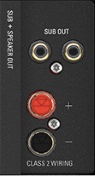
Description
A cartridge with:
- one line-level audio channel, with two RCA sockets carrying the same signal (for example, for a subwoofer)
- one Class-D power amplifier channel, with 4 mm banana / binding post terminals (for example, for a centre loudspeaker).
It is designed to work alongside Selekt power amplifier cartridges. Previously called the Half & Half or Combined cartridge.
DAC module options
A DAC (digital-to-analogue converter) module sets the audio performance of this cartridge.
| Option 1: | Standard (Level-1) |
| Option 2: | Katalyst (Level-2) |
| Option 3: | Organik (Level-3) |
Line output (RCA): 2 V RMS at volume 80; output impedance 300 Ω.
Power Amplifier Output:
- Bridged Class-D amplifier with post-filter feedback using 4mm/Banana/binding post terminals.
| Max output power: |
|||
| 100W/channel into 4Ω load, | |||
| 50W / channel into 8Ω load | |||
| THD+N: | 0.001% | ||
| Dynamic Range | 110dB | ||
| Gain: | 20dB |
Notes
Important: the Selekt power amplifier outputs are Class-D amplifiers. Only connect or disconnect loudspeakers when the Selekt DSM is in sleep mode or switched off.
Notes
- Some electrostatic loudspeakers may need a modification to work with Linn Class-D amplifiers. Check the loudspeaker manufacturer's website for details.
- The Selekt power amplifiers have a slightly lower gain than other Linn power amplifiers, such as the original Majik and Akurate amplifiers. If you are bi-amping a pair of loudspeakers, use either all Selekt power amplifier cartridges, or all Selekt line-level cartridges driving external amplifiers.
- DAC modules are sold separately. One DAC module must be fitted to the cartridge for it to produce audio.
- Choose one of three stereo DAC modules:
- Standard (level 1): the standard Selekt DAC.
- Katalyst (level 2): uses the higher-specification Katalyst DAC architecture.
- Organik (level 3): uses the higher-specification Organik DAC architecture.
- Each cartridge takes one DAC module. You can't fit two DAC modules in the same line-level, power amplifier or Hybrid cartridge.
- Standard and Katalyst DAC modules can be mixed: different cartridges in the same Selekt DSM can use different ones.
- Organik DAC modules can't be mixed with Standard or Katalyst DAC modules in the same Selekt DSM. Use Organik in every cartridge, or in none.
- The Organik Mono DAC module only fits the mono line-out cartridge, and that cartridge only takes the Organik Mono DAC module.
- Organik Stereo and Organik Mono DAC modules can't be mixed in the same Selekt DSM.
For example, a Standard DAC module in slot 1 and a Katalyst DAC module in slot 2 is fine, but an Organik DAC module in slot 1 and a Katalyst DAC module in slot 2 is not. To check a combination, use the Selekt cartridge options checker. To check that your cartridge and DAC combination is allowed, use the Selekt cartridge options checker.
SELEKT STANDARD DAC MODULE
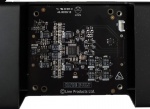
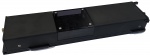
Description
A DAC (digital-to-analogue converter) module that fits inside a Linn Selekt cartridge, giving a high level of audio performance. It fits the line-level, power amplifier and Hybrid cartridges, but not the mono line-out cartridge.
Rules for fitting DAC modules
- Each cartridge takes one DAC module. You can't fit two DAC modules in the same line-level, power amplifier or Hybrid cartridge.
- Standard and Katalyst DAC modules can be mixed: different cartridges in the same Selekt DSM can use different ones.
- Organik DAC modules can't be mixed with Standard or Katalyst DAC modules in the same Selekt DSM. Use Organik in every cartridge, or in none.
- The Organik Mono DAC module only fits the mono line-out cartridge, and that cartridge only takes the Organik Mono DAC module.
- Organik Stereo and Organik Mono DAC modules can't be mixed in the same Selekt DSM.
For example, a Standard DAC module in slot 1 and a Katalyst DAC module in slot 2 is fine, but an Organik DAC module in slot 1 and a Katalyst DAC module in slot 2 is not. To check a combination, use the Selekt cartridge options checker.
SELEKT KATALYST DAC MODULE

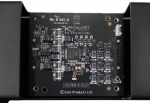
Description
A DAC (digital-to-analogue converter) module that fits inside a Linn Selekt cartridge. It uses the Katalyst DAC for greater audio precision. It fits the line-level, power amplifier and Hybrid cartridges, but not the mono line-out cartridge.
Rules for fitting DAC modules
- Each cartridge takes one DAC module. You can't fit two DAC modules in the same line-level, power amplifier or Hybrid cartridge.
- Standard and Katalyst DAC modules can be mixed: different cartridges in the same Selekt DSM can use different ones.
- Organik DAC modules can't be mixed with Standard or Katalyst DAC modules in the same Selekt DSM. Use Organik in every cartridge, or in none.
- The Organik Mono DAC module only fits the mono line-out cartridge, and that cartridge only takes the Organik Mono DAC module.
- Organik Stereo and Organik Mono DAC modules can't be mixed in the same Selekt DSM.
For example, a Standard DAC module in slot 1 and a Katalyst DAC module in slot 2 is fine, but an Organik DAC module in slot 1 and a Katalyst DAC module in slot 2 is not. To check a combination, use the Selekt cartridge options checker.
SELEKT ORGANIK DAC MODULE

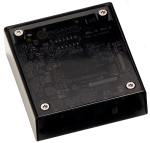
Description
A DAC (digital-to-analogue converter) module that fits inside a Linn Selekt cartridge. It uses the Organik DAC for greater audio precision. It comes in two versions:
- Organik Stereo: for the line-level, power amplifier and Hybrid cartridges.
- Organik Mono: for the mono line-out cartridge.
The Organik Mono DAC module sounds better than the Stereo version, because it has more Organik flip-flops than the Stereo DAC.
Rules for fitting DAC modules
- Each cartridge takes one DAC module. You can't fit two DAC modules in the same line-level, power amplifier or Hybrid cartridge.
- Standard and Katalyst DAC modules can be mixed: different cartridges in the same Selekt DSM can use different ones.
- Organik DAC modules can't be mixed with Standard or Katalyst DAC modules in the same Selekt DSM. Use Organik in every cartridge, or in none.
- The Organik Mono DAC module only fits the mono line-out cartridge, and that cartridge only takes the Organik Mono DAC module.
- Organik Stereo and Organik Mono DAC modules can't be mixed in the same Selekt DSM.
For example, a Standard DAC module in slot 1 and a Katalyst DAC module in slot 2 is fine, but an Organik DAC module in slot 1 and a Katalyst DAC module in slot 2 is not. To check a combination, use the Selekt cartridge options checker.
SELEKT HDMI SWITCHING MODULE
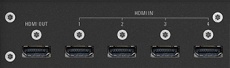
Description
An HDMI 2.0 switching board, which lets you connect HDMI sources, such as a TV box or games console, to the Selekt DSM. It also has an HDMI ARC connection for your TV.
- Fitting this module disables the Selekt DSM's own HDMI ARC socket. Connect your TV to the HDMI OUT socket on the switching module instead.
- Boards made from October 2022 onwards also support eARC (enhanced Audio Return Channel), which can carry higher-quality sound from your TV. Earlier boards support ARC only.
Linn HDMI 2.0 specification
The HDMI 2.0 specification of products that support this HDMI connection are:
Supports 4k resolution @ 60Hz frame rate, 4:4:4, HDCP 2.2, HDR, ARC, CEC, data rate 18Gbps
Upgrades for the HDMI switching module
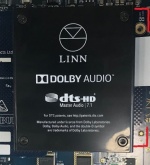
The Linn Surround Module fits onto the HDMI switching module and adds surround sound for HDMI sources.
Linn Surround Module
The Linn Surround Module is a hardware upgrade for some Linn DSM players. It adds surround sound for audio from external inputs, such as HDMI. See the Linn Surround Module specifications for details.
Notes for the Selekt DSM
- The Linn Surround Module fits onto the Selekt HDMI switching module. Once it is fitted, connect your TV to the HDMI OUT socket on the HDMI switching module, not the socket marked HDMI ARC.
- Early Selekt DSMs may need a power supply upgrade before the HDMI switching module can be fitted. Your Linn retailer will check this when you order.
SELEKT UTOPIK POWER SUPPLY

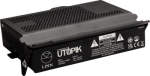
Description:Utopik is our all-new generation of exceptionally efficient and highly responsive switch-mode power supplies for Linn products.
Organik DAC Technology
KATALYST DAC Technology
What is a DAC?
A DAC is a Digital to Analogue Convertor.
This takes a digital signal, (1's & 0's) and converts into analogue signal, (  ). This allows you to feed a digital stream of data and get an analogue signal from it.
DSD file playback on the Linn DS/DSM
DSD (Direct Stream Digital) is a high-resolution audio format, used for SACD releases and some high-resolution downloads.
Linn products that play stereo DSD
- Linn DS and DSM players with Katalyst DACs, running Davaar 60 firmware or later.
- All Linn DSM players with Organik DACs.
- Klimax DSM (2020 variant).
- Majik DSM (2025 variant).
- Any Selekt DSM variant, with a Standard, Katalyst or Organik DAC module, but only in certain cartridge slots:
- With stereo DAC modules (Standard, Katalyst or Organik Stereo): slot 1 only.
- With a pair of Organik Mono DAC modules: slots 1 and 2.
DSD only plays through the analogue outputs. It does not play through:
- Exakt Link, so DSD files will not play on Exakt loudspeakers or ExaktBoxes.
- Digital outputs (Toslink and S/PDIF).
- Songcast to other Linn players.
- Selekt DSM cartridge slots other than those listed above.
DSD is also not supported from external inputs, such as HDMI, Toslink or USB.
Supported formats
- Sample rates: DSD64 (2.8224 MHz) and DSD128 (5.6448 MHz).
- DSD256 (11.2896 MHz) is supported only on the Klimax DSM (2020 variant), the Majik DSM (2025 variant) and all Selekt DSM variants.
- File formats:
- DSF: Sony's format, which supports ID3 tags (track information).
- DFF: an older Philips mastering format, also called DSDIFF.
What changes during DSD playback
DSD is passed directly to the DAC, so no digital signal processing can be applied. This means:
- Exakt crossovers and Space Optimisation are not applied.
- On some DACs, the balance control does not work.
- The maximum volume is 80 (unity gain). If your volume is set higher, for example 90, it drops to 80 for DSD tracks and returns to 90 for other tracks.
The volume control must be enabled
If the Linn player's volume control is disabled in Manage Systems, you will hear clicks from the loudspeakers when you press Play or Pause, or when the sample rate changes between tracks.
Music servers
- Asset UPnP and MinimServer can also index and serve DSD files to Linn players.
HDMI-2
Click <HERE> for more information on HDMI-2
FAQ's
Troubleshooting
Selekt DSM issues
Selekt DSM does not produce any sound from the cartridge(s)
Check Selekt configuration
If this is a new installation, or you have added or changed any Selekt cartridges, check the following:
- DAC modules. Organik DAC modules can't be mixed with Standard or Katalyst DAC modules. Fit either:
- Organik DAC modules in every cartridge, or
- Katalyst and/or Standard DAC modules, in any combination.
- A mix of Organik and Katalyst or Standard DAC modules produces no sound, and the front panel shows a Configuration error warning.
- Cartridge positions. Fit cartridges in order, starting from slot 1: the first cartridge in slot 1, the second in slot 2, and the third in slot 3. For example, using only slots 2 and 3 may result in no sound.
- * Cartridge(s) must be fitted on the order;
- Slot#1 the first cartridge,
- Slot#2 for the second cartridge, if required and
- Slot#3 for the third cartridge, if required.
If the DAC modules and cartridge positions are correct, try the Restore procedure below.
Selekt DSM Recovery from No Audio
Restore Procedure
Using Manage Systems
- 1. Check that your Selekt DSM is powered on and connected to a network with internet access.
- 2. In Manage Systems, select your DSM and go into the GENERAL tab.
- a) Click on "Selekt DSM" text to go into the configuration box,
- b) Scroll down to the bottom of the Network player page and
- click on the " RESTORE SPEAKER FACTORY DEFAULTS text
- c) After a few moments, a pop-up box will appear, click on the RESTORE
- An status box will appear at the bottom of the screen, giving you the status of the upgrade.
- a) Click on "Selekt DSM" text to go into the configuration box,
- 3. When it's finished:
- a) Power cycle the Selekt DSM
- b) Set up the speaker info and see if normal operation has returned.
- c) If not, please contact Linn Helpline.
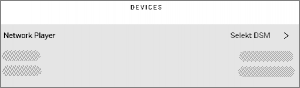
Top Of Page Index
For information on: troubleshooting, Surround options, "Ripping" Cd's , Exakt system then this next section will provide the information that you need:
Technical Specifications
| Overview |
⊕ Versions:
If using Organik DAC's then ALL cartridges MUST use the Organik DAC | ||||||||||||||||||||||||||||
| Dimensions |
(H) 113 mm x (W) 350 mm x (D) 350 mm | ||||||||||||||||||||||||||||
| Weight | 7.2 kg / 15.9 lb | ||||||||||||||||||||||||||||
| Mains supply voltage | (auto ranging)
| ||||||||||||||||||||||||||||
| Power consumption | Sleep 15 W | ||||||||||||||||||||||||||||
| Power continuous | typically 200W but dependant on cartridges used | ||||||||||||||||||||||||||||
| Supported file types | FLAC, WAV, MP3, AAC, AIFF/AIFC, ALAC, OGG/VORBIS, WMA, DSD (DSF and DFF) | ||||||||||||||||||||||||||||
| Audio sample rates | 7.35 k, 8 k, 11.025 k, 12 k, 14.7 k, 16 k, 22.05 k, 24 k,29.4 k, 32 k, 44.1 k, 48 k, 88.2 k, 96 k, 176.4 k, 192 k | ||||||||||||||||||||||||||||
| Word depths | 16–24 bits | ||||||||||||||||||||||||||||
| Control protocol | Compatible with UPnP™ media servers, UPnP™ AV 1.0 control points | ||||||||||||||||||||||||||||
| Ethernet | 100Base-T RJ45 | ||||||||||||||||||||||||||||
| EXAKT | 2off | ||||||||||||||||||||||||||||
| inputs |
1off Ethernet | ||||||||||||||||||||||||||||
| |||||||||||||||||||||||||||||
| |||||||||||||||||||||||||||||
|
1off HDMI ARC | |||||||||||||||||||||||||||||
1off RCA Line level,
| |||||||||||||||||||||||||||||
1off MM Phono,
| |||||||||||||||||||||||||||||
1off MC Phono,
| |||||||||||||||||||||||||||||
2off Toslink
| |||||||||||||||||||||||||||||
2off SPDIF
| |||||||||||||||||||||||||||||
1off USB Audio Class 2
| |||||||||||||||||||||||||||||
| 2off Exakt-Link | |||||||||||||||||||||||||||||
| Sources | LAN Internet radio Tidal Qobuz Calm Radio Spotify Connect NetAux | ||||||||||||||||||||||||||||
| AUDIO OUTPUTS (3 slots for Line and Power cartridges) |
2-channel Line level analogue pre-amplifier output cartridge for Linn Selekt DSM A DAC must be installed in this module | ||||||||||||||||||||||||||||
2-channel power amplifier cartridge for Linn Selekt DSM - A DAC must be installed in this module | |||||||||||||||||||||||||||||
1.1 channel pre and power amplifier cartridge for Linn Selekt DSM | |||||||||||||||||||||||||||||
Exakt-Link | |||||||||||||||||||||||||||||
1 x SPDIF (one SPDIF input can be configured as a fixed volume Stereo digital output) | |||||||||||||||||||||||||||||
| 1 x HDMI Cartridge slot |
SELEKT HDMI SWITCHING MODULE
Linn Surround Module |