
Klimax DS /Organik Update(2022 variant)
|
Linn Klimax DS (Organik upgrade variant) Digital music player 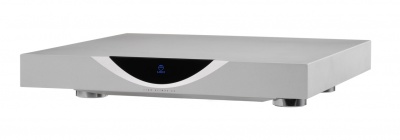
|
| ||||||






Product info
- Product Name: Klimax DS Organik Upgrade (2022 variant)
- Other variants of this product can be found at Klimax DS Variants
- Other variants of this product can be found at Klimax DS Variants
- Date of Introduction: 2022
- Type: ARM Linux - digital music player
- New additional features included in the Organik upgrade from the original Klimax:

- ARM-Linux hardware
- New clock circuitry
- Organik DAC plays up to 384k-24bit files from streamed ethernet sources.
- DSD 256 support
- Apple Airplay 2 support
- Features NOT included in the Organik upgrade compare with Klimax DSM/3
BluetoothWIFIOptical Ethernet network connectionGigabit Ethernet connectionUSB audio supportNew ADC stageFront panel buttons, Dial, Proximity sensorsAdditional back panel connectionsSwitchable Analogue Output
Hardware Upgrades
- UTOPIK Power Supply upgrade: Improved power supply
- Note: It should be noted that this upgrade information may at times be out of date and should not be used as a current list of what upgrades are available.
Initial Configuration
- Considerations before installation, make sure that you have
-
- A mains power socket
- Stable mains supply
- 100-120V rms 50~60Hz,
- 220-240V rms 50~60Hz
- An Ethernet/LAN connection to your broadband Router. (You may need to connect it to a wired network connection to allow setup and configuration.
- The HDMI connection from your TV is not too long and is the correct specification of cables.
 Linn recommend using Premium High Speed Certified HDMI cables for an optimal experience.
- The product has adequate ventilation for operation.
- Positioning
Unpacking
- Remove product from packaging and place on a flat surface
- Please retain all packaging for future transport of Klimax DSM
- Check you have all of the accessories.
Wiring
BACKPANEL
Klimax DS ORGANIK upgrade
Back Panel connections

- MAINS INPUT - To connect to the mains electricity supply.
- EXAKT LINK - To connect to Exakt compatible devices (Exaktbox, Exakt Speakers, Urika II etc)
- ETHERNET - To connect to a network (100Base-T)
- RS232 PORTS1 - For connection to Linn source products without ethernet ports.
- FALLBACK - Used when reprogramming the unit.
- EARTH GROUND - For connecting the unit to an earthing terminal if no mains earth is available or for joining the earths of other products in the system to improve performance in areas of poor/noisy electrical earth conditions.
- UNBALANCED OUT RIGHT, LEFT - To connect to a preamplifier (or power amplifier when internal volume control is enabled) with unbalanced (RCA) analogue inputs.
- BALANCED OUT RIGHT, LEFT - To connect to a preamplifier (or power amplifier when internal volume control is enabled) with balanced (XLR) analogue inputs.
- 1 For RS232 setup examples check HERE

Cables
Exakt Link uses readily available network cables:
- CAT 5/5e UTP/FTP
- CAT 6/6a UTP/FTP
Note: There is no change in the audio performance of the Exakt Link between Cat 5 or Cat 6 Cables.
Configurations
Exakt Systems can be configured either a star from the system master or as a daisy chain configuration. Examples of each configuration is shown below.


Note: There is no change in audio performance between the star configuration or the daisy chain configuration.
For more examples and information, check HERE
To enable Exakt options on the Exakt DS ensure that the internal volume control is turned ON in Manage Systems.
Download App
Initial Installation
- Linn App
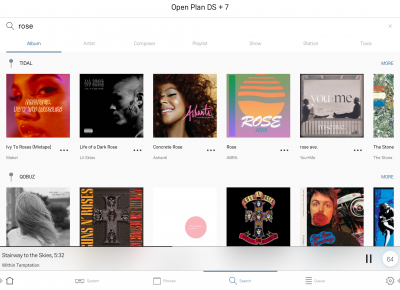
Linn DS/DSM is best controlled using the Linn mobile app

or

Setup and changes
Manage Systems
Configuring your Linn DS/DSM player/Speakers etc:
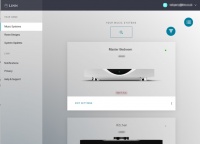
Before you do anything you will need to have a Linn Account. This is a simple process and can only be performed using the Kazoo App or Linn App.
Details on how to create your Linn Account and how to use Manage systems can be found in the Manage Systems page.
Space Optimisation
- Linn Space Optimisation is a digital room-correction and acoustic modelling technology built into all Linn network music players and systems. It removes the unwanted distorting effects of your listening environment to reveal cleaner music.
How It Works
- Acoustic Modelling: Instead of using a calibration microphone, it uses mathematical and physical modelling to analyse how your speakers and room interact.
- Room Parameters: Scan your room using LinnDAR or enter your room dimensions, construction materials, ceiling shapes, and features like windows, doors, and furnishings into a web tool.
- Speaker Matching: Select your specific speaker model from a large database (supporting hundreds of models from both Linn and third-party brands).
- Low-Frequency Control: It targets frequencies below 80 Hz where room boundaries and dimensions cause energy peaks, muddy bass, and prolonged decay, cutting down that distortion.
- Practical vs. Ideal Placement: It allows you to place your speakers in practical positions for your living space while making them sound as though they are sitting in their acoustically ideal locations.
Detailed setup instructions are available HERE.
Using the Linn Klimax DS
Front panel operation
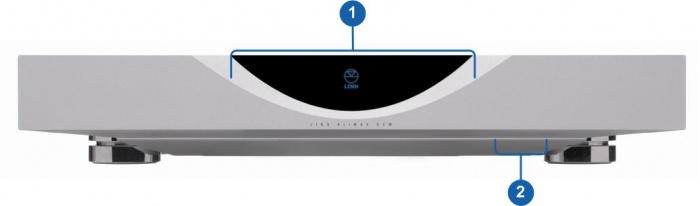
- DISPLAY
- ON / OFF SWITCH
Controlling your Linn DS/DSM using an infrared handset
To control your Linn DS/DSM you can you the infra-red handset supplied with the product as well as the Linn App, Kazoo. This can be downloaded & installed
The infra-red handset supplied has;-
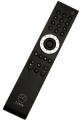
* Volume control, Mute
* Input control with PIN selection
* Radio station selection using the handset joystick,
* Playlist navigation using the handset joystick,
* Transport control (Play, Stop, Pause, Skip & Search) &
* Music information.
The Technical Specifications of the IR handset can be found HERE
Control of the Linn DS/DSM using a PC/MAC/Tablets & Phones
Initial installation
- Linn App
Linn DS/DSM is best controlled using the Linn mobile app
or
Using the Linn DS/DSM control software
These manuals should only be used as a basic guide for what the buttons can do. We would recommend just using the App/Software and only using the guide if you are having difficulty or want to see what more features are available.
These guides may show some features that are not available, or not have not been configured to work in your system. If you're required additional information, then please contact your Retailer or Linn Support Site
- iPad / iPhone / Android Linn App
Features
Tidal

Click here for more information
Qobuz

Click here for more information
Calm Radio

Click here for more information
Spotify Connect

Click here for more information
Roon

Click here for more information
Deezer

Click here for more information
Amazon Music

Click here for more information
Presto Music

Click here for more information
AIRPLAY

Click here for more information
AIRPLAY2

Click here for more information
DSD

Click here for more information
General products manuals and information
Top Of Page Index
Controlling the product User Guide
Product setup:Manage Systems user manual
Third Party Software Copyright
FAQs
Check:
Technical Specifications
| Overview |
| |||||||||||||||||||||
| Dimensions |
(H) 60 mm x (W) 350 mm x (D) 355 mm | |||||||||||||||||||||
| Weight | 10 kg / 22 lb | |||||||||||||||||||||
| Mains supply voltage | (auto ranging)
| |||||||||||||||||||||
| Power consumption | 13 W | |||||||||||||||||||||
| Supported file types | FLAC, WAV, MP3, AAC, AIFF/AIFC, ALAC, OGG/VORBIS, WMA, DSD (DSF and DFF) | |||||||||||||||||||||
| Audio sample rates | 7.35 k, 8 k, 11.025 k, 12 k, 14.7 k, 16 k, 22.05 k, 24 k,29.4 k, 32 k, 44.1 k, 48 k, 88.2 k, 96 k, 176.4 k, 192 k, 384 k | |||||||||||||||||||||
| Word depths | 16–24 bits | |||||||||||||||||||||
| Control protocol | Compatible with UPnP™ media servers, UPnP™ AV 1.0 control points | |||||||||||||||||||||
| Sources | LAN Internet radio Tidal Qobuz Calm Radio Spotify Connect NetAux Amazon Music <Presto music | |||||||||||||||||||||
| Ethernet | 100Base-T RJ45 | |||||||||||||||||||||
| Local Proxy control | RS232 x 2 | |||||||||||||||||||||
| Output Electrical | ||||||||||||||||||||||
| Exakt-link | 2 x RJ45 (CAT-5a) | |||||||||||||||||||||
| Analogue audio outputs |
|