Template:Setup:MajikDSM 2020-Bluetooth
Jump to navigation
Jump to search
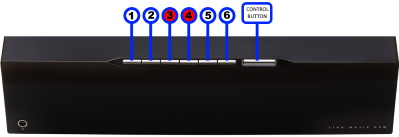
Setting up Bluetooth using the Pin buttons
- 1. Select the Bluetooth menu on your device for pairing
- 2. Press and hold Pins 3 & 4 on the Majik DSM until "Bluetooth: Pairing..." appears on the front panel display
- 3. Select the Majik DSM (Room name), from the list of available Bluetooth devices on your device for pairing