
Template:FAQ:Tidal FAQ
Tidal works on Linn DSMs running Davaar 23 firmware or later, controlled with the Linn App (version 4.4.9 or later).
Tidal is available in the countries listed on the Tidal website.
Enable service
Tidal is switched on or off for each Linn player in Manage Systems:
- On the Manage Systems main page, select your Linn player.
- Select the Music tab.
- Under Tidal, turn the service on or off.
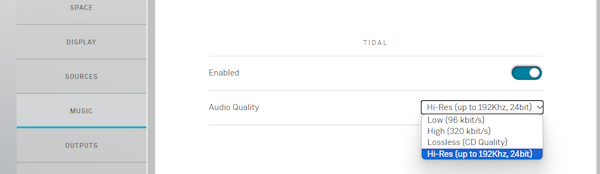
- Choose the audio quality you want (see Tidal audio quality below).
Tidal then appears, or disappears, in the Linn App's Browse options.
What audio formats are supported?
Hi-Res FLAC up to 192 kHz / 24-bit is supported from Davaar 103 firmware onwards. To receive it, set Tidal's audio quality in Manage Systems to Hi-Res (up to 192k 24bit):
Note: Hi-Res Tidal streams need more processing power than older Linn players with PowerPC (PPC) hardware have. On those players, from Davaar 105 onwards, Tidal Hi-Res streams play at up to 48 kHz.
Dolby Atmos
Linn network players don't currently support Dolby Atmos. Tidal tracks available in Atmos play as Hi-Res FLAC instead.
Tidal streaming issues
I can only play Tidal on one of my Linn players
Each Tidal account can only stream to one device at a time. If you play different Tidal music on several Linn players (including Kustom DSM streamers) using the same account, only one will keep playing and the others will stop.
To play Tidal on several Linn players at once, you need a Tidal Family plan, with each Linn player signed in to a different family member's account. See Tidal's pages on subscription types and streaming on several devices.
Setting up a Tidal account, I get the error "Sorry, no flowId is set up"
This is a Tidal account problem. Contact Tidal support for help.
The Linn App shows a red "Connection failed" message
Either your Linn player can't reach the internet, or Tidal's service is offline. Sign out of Tidal in the Linn App, then sign in again. This normally fixes it. If it doesn't:
- Select the Radio source on your Linn player and check that internet radio plays. If it does, the player has internet access.
- If your router has a "smart setup" feature, try turning it off.
- Switch the Linn player off at the mains, then on again, and try Tidal again.
If none of these help, contact Tidal support.
Music from Tidal is dropping out
Your router may be connecting you to a distant Tidal server. Try setting your router's DNS settings to Google Public DNS.
Your home network or broadband connection may also be struggling with the higher bandwidth of Hi-Res audio. If drop-outs are frequent, choose a lower Tidal audio quality in Manage Systems. The new setting takes effect from the next track, so skip to a new track to check whether the drop-outs have stopped.