Template:Info:Tidal1

Tidal is supported by products running Davaar23 firmware onwards, together with Linn App version 4.4.9 or higher.
- Tidal is supported in countries listed on the Tidal website
- This option can be added/removed from the Linn App Browse options by:
- In Manage Systems
- 1 on main web page, select your Linn DS/DSM
- 2 Click in the MUSIC tab
- 3 Under Tidal ENABLE/DISABLE this Service
- 3a You may also change the Audio quality that the Linn DS/DSM receives from Tidal in the setup tab.
- 4 Complete
- In Manage Systems
Hi-Res FLAC
- Up to 192K 24bit FLAC is supported in firmware, Davaar 103 onwards .
- From the 15th November 2023, Tidal will start streaming in Hi-Res FLAC, which is supported with a Linn DS/DSM running Davaar 103 or later firmware.
- You will also have to check the Manage system setting for Music > Tidal is set for Hi-Res (up to 192k 24bit) :
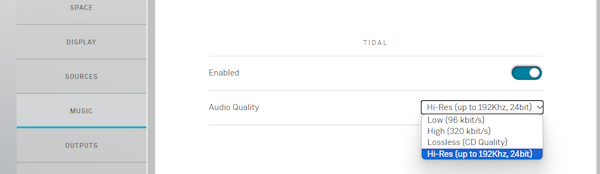
Note that Tidal Hi-Res streams are too computationally intensive for our earlier products. From Davaar105 they are limited to sample rate of 48KHz (CD quality).
- Linn DS/DSM does not currently support Atmos. Tracks will play as Hi-Res FLAC instead.
Check which Tidal Streaming account you have, It is only the Family account that allow multiple Linn DS/DSM to play different Tidal streams at the same time. Check Tidal Subscription types and simultaneous streaming
If you are playing different Tidal tracks on multiple Linn DS/DSM and Kustom DSM Streamers, you will usually find that this will only Play one track and Stop. You need to have a Family account and assign each Linn DS/DSM its own Tidal account.
Contact support@tidalhifi.com for more details
This can be the Linn DS may not have internet access or the Tidal Music server is offline.
Press the Logout button, then try to Login again. This will normally fix the issue. If doesn't check:
- If you are using a BT Home hub5 check that Smart Setup is turned OFF
- On the Linn DS select the Radio input and check that you can get internet Radio from this input. This will tell you if your DS has internet access.
- Try power cycling the Linn DS/DSM then retry selecting Tidal Music selection.
If points 1 or 2 do not make any difference, please contact support@tidalhifi.com
It may also be due to your Network Router connecting you to a distant Tidal server. Check that the Router DNS settings are set for Google public DNS
Alternatively, either your local network, or internet/broadband may be struggling with the higher bandwidth of hi-res audio. If drop-outs are frequent, try changing the quality of audio being fetched:
- Go into Manage Systems > Your DS/DSM & the Music Tab"
- Within the Music tab you will find Tidal, that you can enable/disable and an Audio quality option.
- Change the Audio Quality to a lower setting
Move playback to a new track and check whether the frequency of drop-outs has changed (audio quality setting only takes effect when tracks start).
Within Linn Account Manage systems section you can change the audio quality of Tidal.
Options available are:
- Enabled: To make this Tidal input visible/invisible in your Linn control point.
You can adjust these settings to control the quality of your incoming stream if you have internet issues. If any of these settings are changed then the next Tidal track played will be at the newly selected streaming rate.
- Low(96 kbit/s)
- High(320 kbit/s)
- Lossless (CD quality)
- Note: The highest streaming can also be controlled by your Tidal subscription and may only limit you to HIGH(320 kbit/s) on the standard service.